

1-Visitor
September 11, 2017
Question

Value Display Widget (responsive) has no Label

  • September 11, 2017
  • 8 replies
  • 4044 views

Hello,

I want to create a button with a label on it that is responsive and that can change the display style based on a "Selected"-state. As I don't want to use anything like Tabs or the fixed size buttons, I thought to use a value display. But the problem is that the value display removes the Label-property if it is used in a responsive container (layout).

Is that a bug?

Here's an example of what I try to achieve.
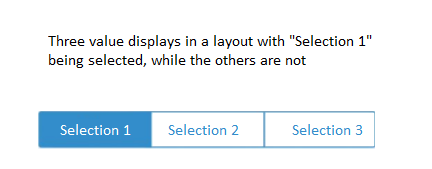
Example.png

Thanks,

F.

8 replies

13-Aquamarine
September 11, 2017

Hi Frank,

Yes! Looks like this is a bug . Article Viewer | PTC .

This has been reported to R&D in Jira PSPT-2735.

1-Visitor
September 11, 2017

Hello,

thanks for the quick response. I found the article in the meantime myself. I feel a little worried because this issue seems to be 1.5 years old and still exists two TW-versions later. Is there a workaround or something? 

Frank

13-Aquamarine
September 11, 2017

Frank,

Sorry for the inconvenience.There seems to be a workaround by adding your own label(using the label widget) in it's own row or sidebar.

13-Aquamarine
September 12, 2017

Or try adding a panel to your layout and then adding the Value Display widget . This will makes it's Label property visible.

1-Visitor
September 13, 2017

This works, but it makes the Value Display inresponsive. So this is not an option.