1-Visitor
March 30, 2020
Solved

valuedisplay widget

  • March 30, 2020
  • 1 reply
  • 3567 views

I use a value display widget to make it red if it's smaller than 10, and

bigger than 10, smaller than 20 blue, finally

bigger than 20, smaller than 30 green.

What can I do?

Best answer by raluca_edu

Hi,


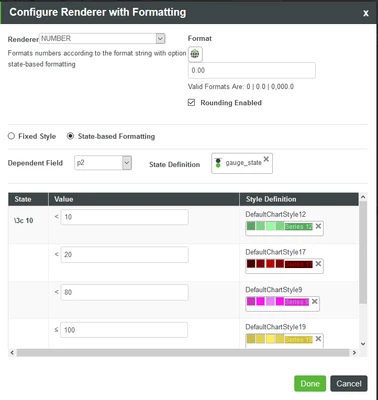
You can use state base formatting , if you are using valuedisplay widget (not ptcs-valuedisplay).

State base should look like this in Properties of widget > Value Format (this is an example, you need to adjust the values):

raluca_edu_0-1585557565334.png

Hope it helps,

Raluca Edu

1 reply

raluca_edu
17-Peridot
March 30, 2020

Hi,


You can use state base formatting , if you are using valuedisplay widget (not ptcs-valuedisplay).

State base should look like this in Properties of widget > Value Format (this is an example, you need to adjust the values):

raluca_edu_0-1585557565334.png

Hope it helps,

Raluca Edu

JackEom1-VisitorAuthor
1-Visitor
March 30, 2020

Thank you for answering me, Raluca Edu.


but Like the photo 'test2" I don't see the "< "as you


I worked with Photo "test" 


Is it right to do this?


raluca_edu
17-Peridot
March 30, 2020

Hi,


It is ok as in 'test' image, you need to create state definition first.

Sorry, I forgot to mention you that.


Raluca Edu