
12-Amethyst
May 8, 2019
Solved

Web frame widget border

  • May 8, 2019
  • 6 replies
  • 2790 views

Hi,


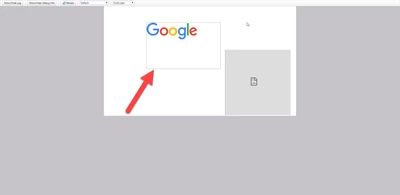
I was wondering regarding web frames. I have attached a picture of a static mashup and a web frame.

There is a grey border around the web frame which in this case shows a .jpg of the google logo. This is also the situation in responsive mashup with layouts.


My question is. Is it possible to get rid of the grey border? - If not, where do I propose a change/improvement?
webframeframequestion.png


Best answer by slangley

Hi @jonasf.


We created myWebframeBorderClass using the custom CSS editor and applied this class to the widget:


.myWebframeBorderClass .widget-webframe-container {
    border: 5px solid #9a9fa6;
}


Give this a try and let us know if you still have questions.


Regards.


--Sharon

6 replies

Support
May 9, 2019

Hi @jonasf.


Is your screenshot from a laptop/desktop browser?  What version of ThingWorx are you running?  What selections did you make when creating the mashup?


Could you please export the mashup and post it here?


Regards.


--Sharon

jonasf12-AmethystAuthor
12-Amethyst
May 13, 2019

Hello,


Currently using ThingWorx 8.4.2-b2151 and the screenshot is taken on a desktop browser in the view mashup window. The settings are found below.

As mentioned earlier the mashup is a static frame but the same behaviour exists with a responsive mashup where layouts are used.

2019-05-13_13-08-31.png