18-Opal
March 20, 2017
Question

what the tablespace "thingworx" already exist?
  • March 20, 2017
  • 3 replies
  • 3067 views

help.jpg

I replace SET tablespace_location=C:\ThingworxPostgresqlStorage

but didn't work plz help me

how can i get thingworx composer?

    3 replies

    5-Regular Member
    March 20, 2017

    seonho Cha

    You can get ThingWorx from our support portal: https://support.ptc.com/appserver/auth/it/esd/index.jsp

    5-Regular Member
    March 20, 2017

    seonho Cha​ Could you describe us a bit more in details what exactly the problem is, along with the actions you proceeded with, so far? Thanks!

    CHASEONHO18-OpalAuthor
    18-Opal
    March 21, 2017

    i following staka's video and download tomcat 8.0.42, postgresql 9.4, Thingworx-platform-postgre-7-1-10 on PTC support page

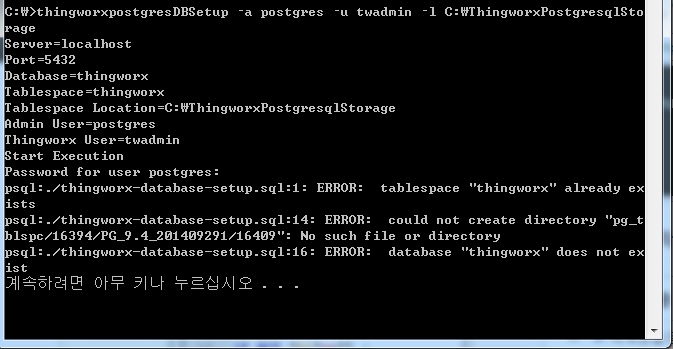
    but when i excute thingworxPostgresDBSetup.bat (i replace loacation "\ThingworxPostgresqlStorage" -> "C:\ThingworxPostgresqlStorage")

    apeer some error

    psql:./thingworx-database-setup.spl:1: ERROR: tablespaace "thingworx" already exists

    psql:./thingworx-database-setup.spl:14: ERROR: could not create directory "pg_tblspc/16394/PG_9.4_201409291/16409": No such file or direcrory

    psql:./thingworx-database-setup.spl:14: ERROR: database "thingworx" does not exist

    i make directory called ThingworxPostgresqlStorage in root

    and i create new role user "twadmin"

    but i can't make new database"thingworx" and new schema "thingworx"

    so, i can open appmanager /Thingworx on Tomcat localhost

    please help me why didn't make database and schema . thank for your kind.

    ps. i give Administrator rights each folder ThingworxPostgresqlStorage and thingworxPostgresDBSetup.ba

    20-Turquoise
    March 20, 2017

    Is this a fresh install? If so, try running the Delete/DatabaseCLeanup script first, then the installation ones.

    Also please refer to this article:Frequently Seen Errors upon launching the Thingworx application:

    CHASEONHO18-OpalAuthor
    18-Opal
    March 21, 2017

    Thanks , i trying