


Solved
Hi
Did you run the db scripts more than once and perform some cleanup in between runs? I can see in your screenshot, errors indicating the thingworx database does not exist but the thingworx tablespace does. Since this appears to be a new installation, you can do the following:
1. Drop the thingworx database and tablespace by right-clicking each, then selecting Delete/Drop:
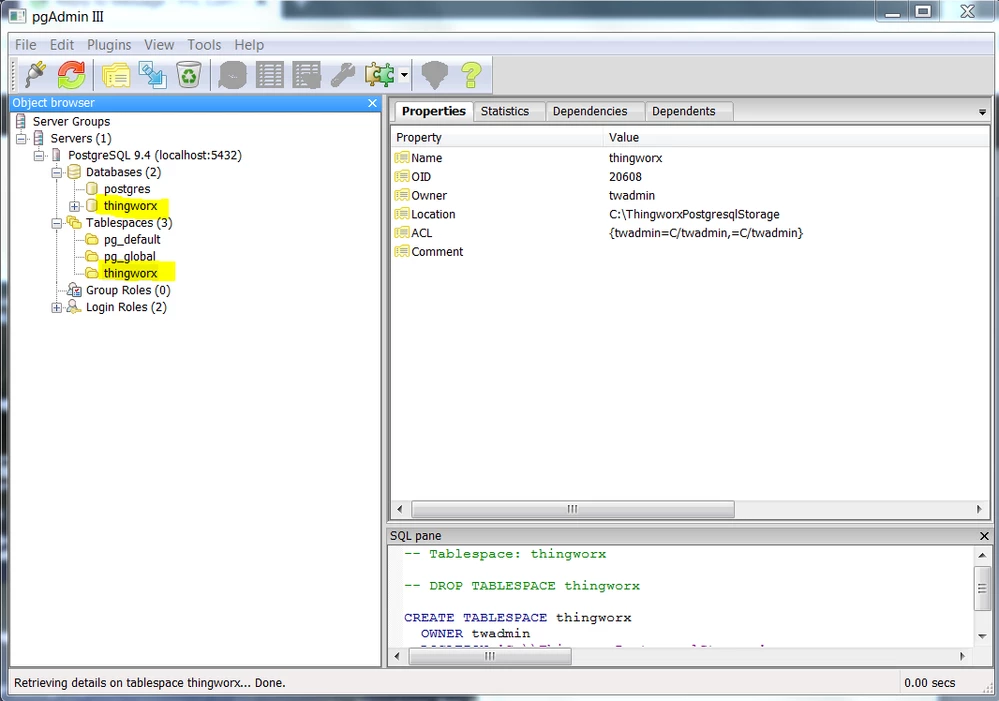
2. Make sure the login role exists for twadmin.
3. Check the \ThingworxPostgresqlStorage folder and if files/folders did not get removed after performing step 1, delete them
4. Re-run the following scripts per the instructions in the Installation guide:
thingworxPostgresDBSetup.bat
thingworxPostgresSchemaSetup.bat
If you still have issues after performing these steps, please let us know.
Regards.
--Sharon