

1-Visitor
April 10, 2017
Solved

While working on Libelium IOT Extention in Market place I am not able to import the downloaded zip file.

  • April 10, 2017
  • 3 replies
  • 1900 views

Dear Support,@@

Hope you are doing well. I am working on Libelium IOT platform.

In our new project I am trying to make a dashboard on my Thingworks foundation. From ThingWorks Market place I have downloaded extension for Meshlium extreme. Now in ThingWorks composer when I am trying to open my downloaded extension for Meshlium Extreme I am getting error that

Code:

Extension must have a metadata.xml file.

After importing this file only I can move forward. So please guide me for the same.


Following are the steps what we have followed.

1. We have downloaded the extension for Libelium Meshlium and Dashboard from ThingWorks marketplace. (Zip Files)

2. We have ThingWorks Trial version for a month now.

3.After opening ThingWorks Composer, I have selected Import/Export Tab.

4.In Import I have selected my downloaded Zip file for Meshlium. Also I have tried same with Dashboard file.

5. But I am getting error attached in above post.

To view screen shots please find the one drive link below.

https://1drv.ms/f/s!Au6bWTbtCaQDhUxlqI_Ms2Aq61kK

Awaiting for your reply

Regards

Piyush
Best answer by posipova

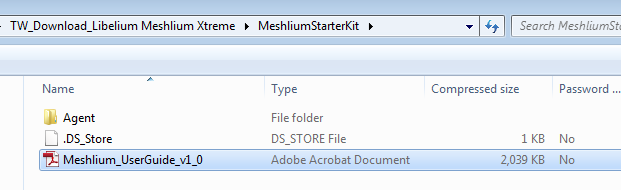
This is not a Thingworx extension but rather a starter kit. When you unzip the downloaded package, you can see the contents, including the guide:

Also please keep in mind the support note on the marketplace for this kit:

"This item has been tested and certified by ThingWorx to successfully work with the ThingWorx platform, however this item is not currently supported by ThingWorx. By utilizing this item you acknowledge that the content is provided in ‘as-is’ condition and support will not be provided."

3 replies

posipova20-TurquoiseAnswer
20-Turquoise
April 10, 2017

This is not a Thingworx extension but rather a starter kit. When you unzip the downloaded package, you can see the contents, including the guide:

Also please keep in mind the support note on the marketplace for this kit:

"This item has been tested and certified by ThingWorx to successfully work with the ThingWorx platform, however this item is not currently supported by ThingWorx. By utilizing this item you acknowledge that the content is provided in ‘as-is’ condition and support will not be provided."

1-Visitor
April 17, 2017

Hi Polina,

Thanks for your reply. As per this document we don't have to import any extensions it seems. In my ThingWorks worksop our trainer told us that if you are downloading any extensions from Market place you have to import that in your thingworks composer. Because while performing on Tweeter extension we have imported that extension on composer. Similarly I have downloaded the extension for Libelium meshlium. In that same folder this mentioned pdf is available.

can you please explain why Import is not required?

mean while I will try without import as per your suggestion and will get back to you soon.

Regards

Piyush

20-Turquoise
April 17, 2017

Not everything available on the Marketplace acts as a Thingworx-uploadable extension. The products are simply designed to extend the functionality of your thingworx application.  In this case - it's a kit.