12-Amethyst
March 28, 2025
Solved

WRS Rest API Endpoint not visible in ThingWorx

  • March 28, 2025
  • 1 reply
  • 765 views

Version: Windchill 12.1


Use Case: Rest API Endpoint not visible


Description:
11025060_0-1743173257778.png


11025060_1-1743173257776.png


11025060_2-1743173257626.png


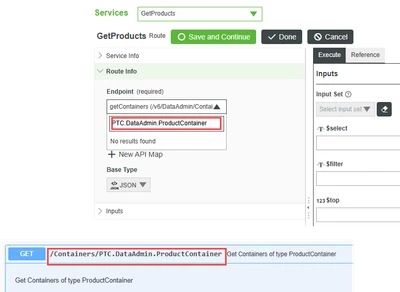
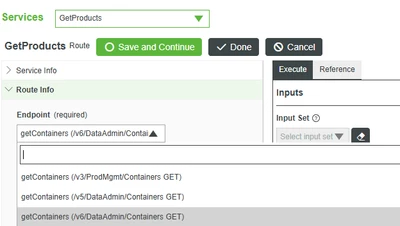
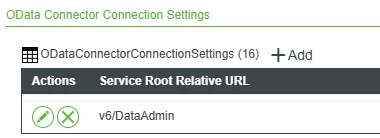
I have the v6/DataAdmin in OData Connector Connection Settings on the OdataConnector. I am able to see the getContainers API but I need to get list of Products, so I'm looking for this end point but it is not visible in thingworx connector. 

/Windchill/servlet/odata/v6/DataAdmin/Containers/PTC.DataAdmin.ProductContainer

 

Best answer by pshashipreetham

Below are three kinds of issues you may be facing:

1. Access Control Issue (ACL) or Permissions

  • The ProductContainer The endpoint is part of the Windchill OData layer, but not all containers are exposed to all users.

  • If your Windchill user cannot access the Product Containers, the endpoint won’t be visible in the connector.

Fix:

  • Verify that the user associated with the ThingWorx OData connector has read access to product containers.

  • Log in to Windchill directly using the same credentials → Check if you can query the OData URL directly:

     
    https://<host>/Windchill/servlet/odata/v6/DataAdmin/Containers/PTC.DataAdmin.ProductContainer

    If it gives a 403/empty or error → it's a permissions issue.

2. OData Endpoint Not Exposed in Windchill

  • Windchill OData services are modular. Some entity sets  PTC.DataAdmin.ProductContainer may be disabled in certain deployments.

Fix:

  • Log in to Windchill Method Server and check:

    • codebase/WEB-INF/ODataEntityProvider.xml

    • Confirm that PTC.DataAdmin.ProductContainer is registered and exposed.

If missing, you'll need to extend or expose it manually via Windchill customisation.


3. Connector Caching Issue in ThingWorx

  • The ThingWorx OData connector sometimes does not refresh available endpoints even when Windchill is correctly configured.

Fix:

  • In ThingWorx:

    1. Go to your OData Connector Thing.

    2. Delete and re-add the Service Root (v6/DataAdmin).

    3. Or restart the ThingWorx server if that doesn't work.

This forces a fresh discovery of available endpoints.


4. Wrong or Incomplete Endpoint Mapping

  • If the GetProducts Service in your screenshot is manually configured, make sure the correct endpoint path is typed fully:

    swift
    /Containers/PTC.DataAdmin.ProductContainer
  • You cannot just browse it via a dropdown if it's not auto-discovered—manual entry is required.


Thanks,

1 reply

18-Opal
April 29, 2025

Below are three kinds of issues you may be facing:

1. Access Control Issue (ACL) or Permissions

  • The ProductContainer The endpoint is part of the Windchill OData layer, but not all containers are exposed to all users.

  • If your Windchill user cannot access the Product Containers, the endpoint won’t be visible in the connector.

Fix:

  • Verify that the user associated with the ThingWorx OData connector has read access to product containers.

  • Log in to Windchill directly using the same credentials → Check if you can query the OData URL directly:

     
    https://<host>/Windchill/servlet/odata/v6/DataAdmin/Containers/PTC.DataAdmin.ProductContainer

    If it gives a 403/empty or error → it's a permissions issue.

2. OData Endpoint Not Exposed in Windchill

  • Windchill OData services are modular. Some entity sets  PTC.DataAdmin.ProductContainer may be disabled in certain deployments.

Fix:

  • Log in to Windchill Method Server and check:

    • codebase/WEB-INF/ODataEntityProvider.xml

    • Confirm that PTC.DataAdmin.ProductContainer is registered and exposed.

If missing, you'll need to extend or expose it manually via Windchill customisation.


3. Connector Caching Issue in ThingWorx

  • The ThingWorx OData connector sometimes does not refresh available endpoints even when Windchill is correctly configured.

Fix:

  • In ThingWorx:

    1. Go to your OData Connector Thing.

    2. Delete and re-add the Service Root (v6/DataAdmin).

    3. Or restart the ThingWorx server if that doesn't work.

This forces a fresh discovery of available endpoints.


4. Wrong or Incomplete Endpoint Mapping

  • If the GetProducts Service in your screenshot is manually configured, make sure the correct endpoint path is typed fully:

    swift
    /Containers/PTC.DataAdmin.ProductContainer
  • You cannot just browse it via a dropdown if it's not auto-discovered—manual entry is required.


Thanks,

Community Manager
May 8, 2025

Hi @11025060 


Did you find the response provided by Shashi helpful?  If so, please mark it as the Accepted Solution for the benefit of others in the community.


If you still have questions, please let us know.


Regards.


--Sharon