16-Pearl
March 22, 2021
Solved

3D Input Widget Image and Text

  • March 22, 2021
  • 1 reply
  • 1215 views

Hi, there


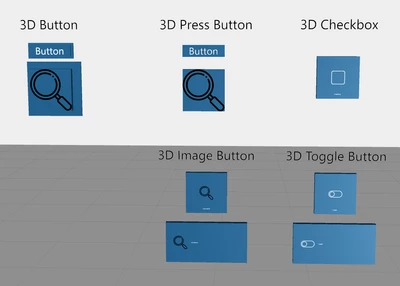
I tried new 3D Input Widgets (3D Press Button, 3D Image Button, 3D Checkbox, 3D Toggle Button),

therefore have some questions.

3dwidgets comparison.png


3D Press Button looks like old 3D Button without backpanel.

which is fine with text only. but for with Image provide, some padding would be better.


So first, how to control padding of image in new 3D Input Widgets (with and without text)?


As seen in the image above, text in 3D Image Button, 3D Checkbox and 3D Toggle Button are too small.

How to control text properties of new 3D Input Widgets? 


Thanks in advance.

Best answer by RolandRaytchev

Hi @dsgnrClarK ,

It seems that currently this is not possible , or better to say there is no supported way to apply styles for these 3D elements - supported are only the provided in Studio UI properties panel

Let say we define some code to print the property on click on the console

document.addEventListener('userpick', function (ev) { 
 var widget = ev.target.closest('twx-widget');
 if (widget) {
 console.log('*->the widget clicked is ', widget.getAttribute('widget-id'));
 console.warn(widget)
 $scope.app.clickButton(widget.getAttribute('widget-id').toString())
 }
}); 
//============================================================
$scope.app.clickButton= function(target) //work of ModelItem widgets
{
console.warn($scope.view.wdg[target.toString()])
}
//============================================================


this will print on click  3D elements like check box or 3D Toggle button:

{widgetName: "3DToggleButton-1", textNotPressed: "", src: "app/resources/Default/toggleOn.png", srcNotPressed: "app/resources/Default/toggleOff.png", disabled: false, …}
color: "rgba(28, 97, 148, 1);"
disabled: false
fontColor: "rgba(255, 255, 255, 1);"
height: 0.04
pressed: true
rx: 0
ry: 0
rz: 0
shader: ""
src: "app/resources/Default/toggleOn.png"
srcNotPressed: "app/resources/Default/toggleOff.png"
text: ""
textNotPressed: ""
visible: true
widgetName: "3DToggleButton-1"
width: 0.04
x: 0.0941
y: -0.0382
z: 0.0555
__proto__: Object
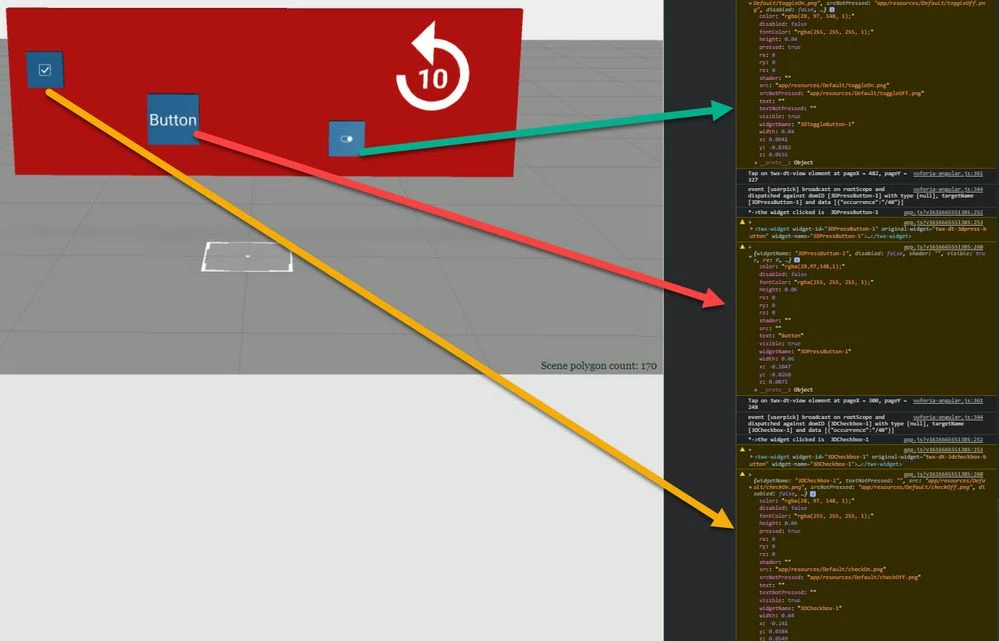
2021-03-25_10-47-57.jpg

So far, we see - only the listed attributes / properties could be used. 

Possibly we can use src properties and shader to change the appearance of the 3 D elements.  Example you can use a shader which will simulate some style effects, but I do not believe that this will be easy.


1 reply

21-Topaz I
March 25, 2021

Hi @dsgnrClarK ,

It seems that currently this is not possible , or better to say there is no supported way to apply styles for these 3D elements - supported are only the provided in Studio UI properties panel

Let say we define some code to print the property on click on the console

document.addEventListener('userpick', function (ev) { 
 var widget = ev.target.closest('twx-widget');
 if (widget) {
 console.log('*->the widget clicked is ', widget.getAttribute('widget-id'));
 console.warn(widget)
 $scope.app.clickButton(widget.getAttribute('widget-id').toString())
 }
}); 
//============================================================
$scope.app.clickButton= function(target) //work of ModelItem widgets
{
console.warn($scope.view.wdg[target.toString()])
}
//============================================================


this will print on click  3D elements like check box or 3D Toggle button:

{widgetName: "3DToggleButton-1", textNotPressed: "", src: "app/resources/Default/toggleOn.png", srcNotPressed: "app/resources/Default/toggleOff.png", disabled: false, …}
color: "rgba(28, 97, 148, 1);"
disabled: false
fontColor: "rgba(255, 255, 255, 1);"
height: 0.04
pressed: true
rx: 0
ry: 0
rz: 0
shader: ""
src: "app/resources/Default/toggleOn.png"
srcNotPressed: "app/resources/Default/toggleOff.png"
text: ""
textNotPressed: ""
visible: true
widgetName: "3DToggleButton-1"
width: 0.04
x: 0.0941
y: -0.0382
z: 0.0555
__proto__: Object

2021-03-25_10-47-57.jpg

So far, we see - only the listed attributes / properties could be used. 

Possibly we can use src properties and shader to change the appearance of the 3 D elements.  Example you can use a shader which will simulate some style effects, but I do not believe that this will be easy.