

3D model colors are not correct in an animation sequence
I have noticed what seems like a bug with model colors in an animation sequence. The colors are either wrong or are ignored when not all surfaces of the original model have the same color.
I'm using Studio Version 1.12 (0.1.16.1485).
Hoe to reproduce:
- In Creo Parametric, add a different color to one or several faces of a model in an assembly of models. In my example, I colored some faces blue while the rest of the model is red. Two other models are uncolored (gray) and all red.
- Use this assembly model in Creo Illustrate to create a sequence. Then publish to pvz.
- Use this pvz in ThingWorx Studio. Create 2 views: one showing the animation sequence from the embedded pvi, and one showing just the static assembly. Publish and view using the View app. The colors are fine in the static view; but in the animation view, any models that employ multiple colors will have either no color (gray) or just one color. Other models that are colored with only one color appear correct.
This is what I expect to see:
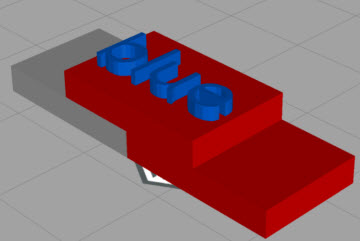
The Preview of the animation looks correct; only the animation in the actual experience reveals the bug. In my case, the red model with some blue surfaces appears all blue.
Can someone in R&D take a look? The pvz is attached. I can provide the original Creo Parametric files if you want.
Thanks,
Jeff