

1-Visitor
June 17, 2019
Solved

Assign the value to the "text input" cell by the number of clicks on the "button" cell.

  • June 17, 2019
  • 1 reply
  • 1737 views

Hello.

Help me assign the value to the "text input" cell by the number of clicks on the "button" cell.

For example:

You click on the button once - cell "text input" takes the value "1".

You click on the button twice - cell "text input" takes the value "2" etc.

Best answer by jmikesell

I can only figure out how to do this with some JS.

You can use an Application Parameter or and var in the JS. Here is how to do it with the app.param

  • Create an application parameter in this case 'myValue'
  • Drag the link handle thing from that parameter to the "Text" handle of your textArea
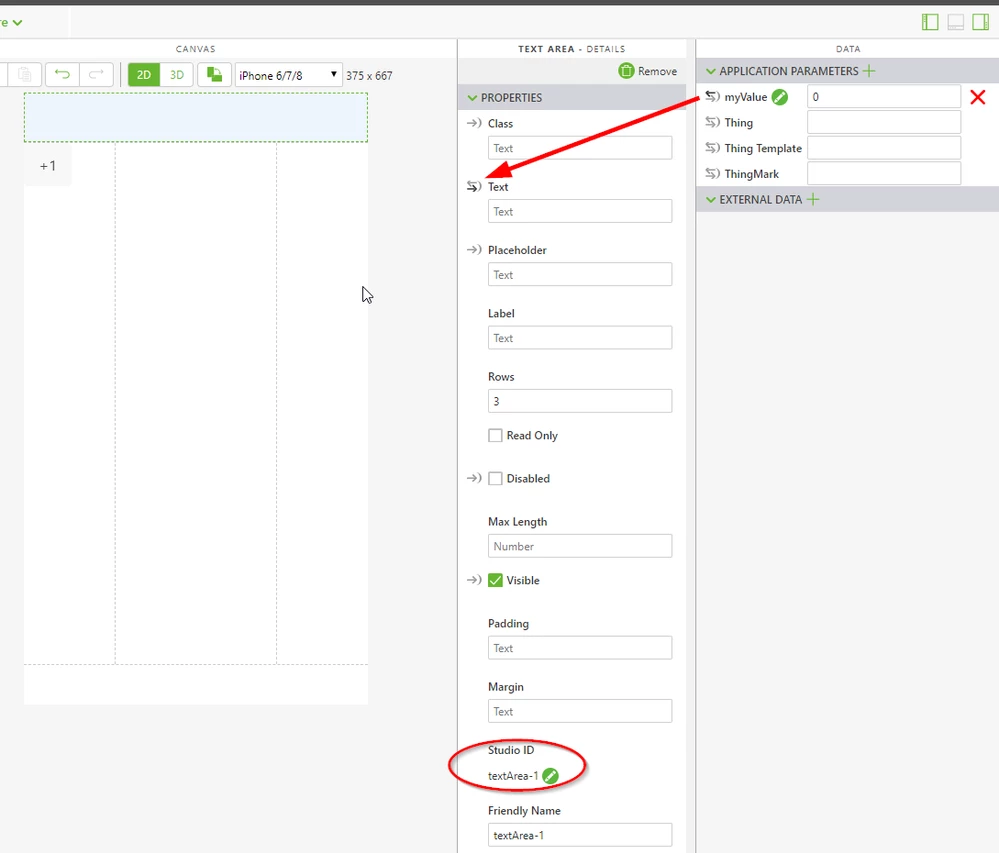
  • 2019-06-17 12_58_56-Design - Vuforia Studio.png
  • Then in the buttons add a call to the JS function we are going to create
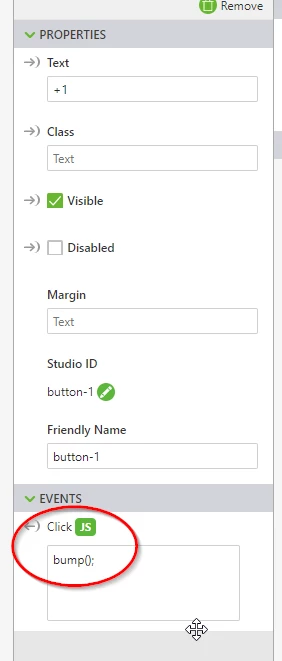
  • 2019-06-17 13_01_00-Design - Vuforia Studio.png
  • Now the JS code
$scope.bump = function () {
 $scope.app.params.myValue = parseInt($scope.app.params.myValue) + 1;
 //you need parseInt as parameters are strings
}

1 reply

jmikesell1-VisitorAnswer
1-Visitor
June 17, 2019

I can only figure out how to do this with some JS.

You can use an Application Parameter or and var in the JS. Here is how to do it with the app.param

  • Create an application parameter in this case 'myValue'
  • Drag the link handle thing from that parameter to the "Text" handle of your textArea
  • 2019-06-17 12_58_56-Design - Vuforia Studio.png
  • Then in the buttons add a call to the JS function we are going to create
  • 2019-06-17 13_01_00-Design - Vuforia Studio.png
  • Now the JS code
$scope.bump = function () {
 $scope.app.params.myValue = parseInt($scope.app.params.myValue) + 1;
 //you need parseInt as parameters are strings
}
ifadeev1-VisitorAuthor
1-Visitor
June 19, 2019
Thank! It works!
I did not immediately see that the parameter "myValue" needed to be set to "0" =)