
1-Visitor
February 9, 2017
Solved

Can I change a background color of 2D widget?

  • February 9, 2017
  • 2 replies
  • 3007 views

Hi

I'm making a demo project by thingworx studio.

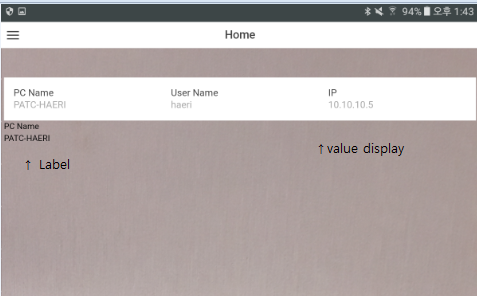
I wanna change a background color of '2D' widget.

When I use a 'value-display' widget, the background color is white and font color is black.

Also, I want to change a color of button widget(2D).

Is it possible? if it is possible, please let me know how to do.

Thanks.
Best answer by mneumann

Sure...

you can change it through classes.

An easy example just to get to know the concept is creating a Button Widget.

In it's properties you can assign a class, e.g. "redButton" - this is the CSS class used for styling.

If in (left hand panel) Styles > Application​ you add a

.redButton {

  background: red;

}

it will allow changing the style and presentation of the particular slide with default CSS stylings.

When you now preview / publish the experience you will see, that the Button has now a red background.

I tested it and it's the same for the ValueDisplay.

2 replies

1-Visitor
February 15, 2017

Hi,

Create a css class with your all color requirements and add it in "STYLES->application" and use the same class name in widget class field.

This will work.

Regards,

Sameer Singh Rathoud

mneumann16-PearlAnswer
16-Pearl
February 15, 2017

Sure...

you can change it through classes.

An easy example just to get to know the concept is creating a Button Widget.

In it's properties you can assign a class, e.g. "redButton" - this is the CSS class used for styling.

If in (left hand panel) Styles > Application​ you add a

.redButton {

  background: red;

}

it will allow changing the style and presentation of the particular slide with default CSS stylings.

When you now preview / publish the experience you will see, that the Button has now a red background.

I tested it and it's the same for the ValueDisplay.