

1-Visitor
October 29, 2021
Solved

Can I find cached pvz model in my computer?

  • October 29, 2021
  • 1 reply
  • 1453 views

I used CAD Optimizer to optimize the model. Are these optimized models(.pvz model) that are cached in a local folder? 

In other words, Can I find these .pvz files on the local computer?
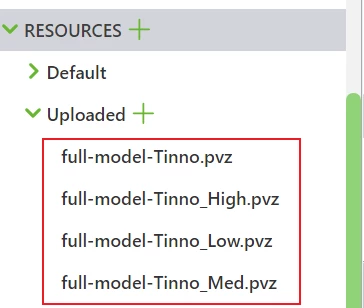
ZL_9884170_0-1635478409016.png

The reason WHY I want to get these models is that I want to open this model in Creo View, but the current model format is.IGS, which cannot be opened by Creo View.  So if there is another way to let me open this model in Creo View, I am willing to try.

 
Best answer by RolandRaytchev

Hi @ZL_9884170 ,

please check in your project folder. In the normal case it should be in the Document  subfolder


%HOME%\Documents\VuforiaStudio\Projects\<YourProjectName>\src\phone\resources\Uploaded


let say you HOME variable is set   C:\Users\userXYZ     and your Project Name is TestPTC

In this case you can look then into


 C:\Users\userXYZ\Documents\VuforiaStudio\Projects\TestPTC\src\phone\resources\Uploaded


1 reply

21-Topaz I
October 29, 2021

Hi @ZL_9884170 ,

please check in your project folder. In the normal case it should be in the Document  subfolder


%HOME%\Documents\VuforiaStudio\Projects\<YourProjectName>\src\phone\resources\Uploaded


let say you HOME variable is set   C:\Users\userXYZ     and your Project Name is TestPTC

In this case you can look then into


 C:\Users\userXYZ\Documents\VuforiaStudio\Projects\TestPTC\src\phone\resources\Uploaded


1-Visitor
October 29, 2021

Thank you very much!I found the file I was looking for!