

10-Marble
April 30, 2020
Solved

Can you use spinners to hide model loading?

  • April 30, 2020
  • 2 replies
  • 3264 views

I have a large model with several sequences. The user can load different sequences with buttons that call:


var myPVZ = "Illustration"; //Sequence name
var consistent = "app/resources/Uploaded/" + myPVZ + "/l-Model - ";
$scope.view.wdg['3D_model'].sequence = consistent + "Default" + ".pvi"; //Load sequence


The sequence then takes a couple of seconds to load and you can see different parts of the model appearing as it does. I wondered if it's possible to hide this loading with a spinner and then reveal the model at once when it has fully loaded.


For example:

  • Set 3D_model visibility = false
  • Start spinner
  • Start load sequence
  • 2 second delay
  • Stop spinner
  • Set 3D_model visibility = true

Is this a good approach?

Alternatively is there a parameter that reports when a model has loaded, rather than using a delay?
Best answer by RolandRaytchev

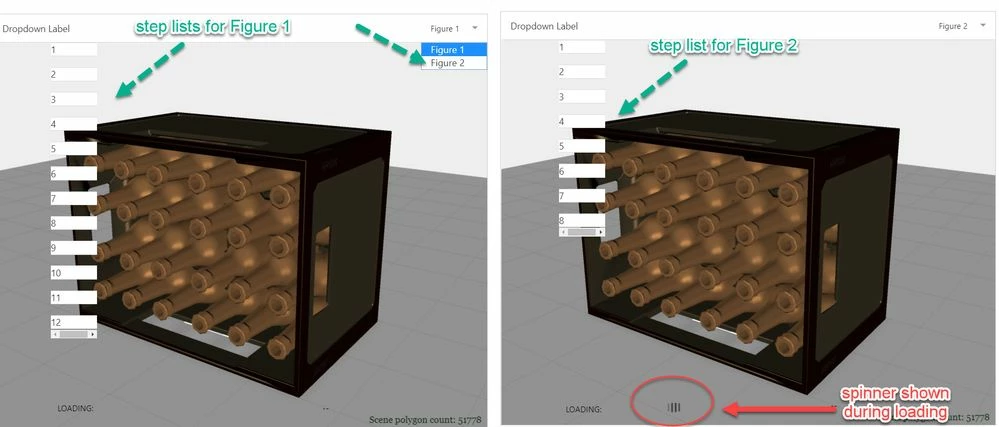
Because I did not have a project with a  sequence  which requires a long loading time , therefore I did not have such example. Although I have  large models with a complex sequences but I could not publish here because they contains confidential data could not be published in the community. To be able to simulate the waiting on loading of large sequence this I used a delay =5000 inside the $timeout(, delay) ; service.

So the code which called is something like:

...
//makes the spinner visible and then load the sequence
 $scope.setWidgetProp('spinner-1', 'visible', true);$scope.$applyAsync();
 $timeout(function () {
 $scope.$applyAsync(()=>{$scope.setWidgetProp(modelName, 'sequence', 'app/resources/Uploaded/l-Creo 3D - '+sequence +'.pvi');}); 
 },50);
....
// event which is called when the sequnece loading is completted
//================================================================
$scope.$on("sequenceloaded", function (evt, arg) {
 
 let delay=5000;//it should be 0, but to loading is too fast
//in this exampole therefore I will blank the spinner wdg with delay 5secs
 $timeout(()=>
 {$scope.setWidgetProp('spinner-1', 'visible', false);$scope.$applyAsync();},
 delay);
 
});
//=============================================

2020-05-04_14-36-12.jpg

I adapted a demo project to demonstrate the suggested option  and attached it to this post

2 replies

21-Topaz I
April 30, 2020

Hi @rhudd 

I think setWidgetProp is better for usage- example:

$scope.setWidgetProp('model-1', 'sequence', "app/resources/Uploaded/l-Creo 3D - Figure1.pvi");
twx.app.fn.triggerWidgetService("model-1", 'play');
//or
$scope.setWidgetProp('model-1', 'sequence', "");
$scope.setWidgetProp('model-1', 'sequence', undefined);
//to reset it

Sometimes is a good thing to reset first the sequence.  And then to set the value.

When you set an sequence it could override the modelItem display , so that setting visibilty of particular modelitems could have no effect. Therefore  we need to reset the sequence value first

Here another example to set sequence where the sequences names are saved in array

let piv_names =["l-Creo 3D - Firgure1","l-Creo 3D - Test","l-Creo 3D - OtherTest"];
$scope.app.loadsequenceplay = function(nr)
	{ 
 $scope.setWidgetProp('model-1', 'sequence', "app/resources/Uploaded/"+piv_names[nr]+".pvi"); 
 $scope.$applyAsync();
 $scope.view.wdg['model-1']['forceHidden'] = true;
	 twx.app.fn.triggerWidgetService("model-1", 'play');
 $scope.$applyAsync();
 $scope.view.wdg['model-1']['forceHidden'] = false;
 };


21-Topaz I
April 30, 2020

further you make the model widget unvisible and register the event listener:

$scope.$on("sequenceloaded", function (evt, arg) {
 console.log("sequence loaded, starting play");
 $scope.setWidgetProp("loading","visible",false);
 $scope.app.fn.triggerWidgetService("model-1","playAll");
});

according to 

https://community.ptc.com/t5/Vuforia-Studio-and-Chalk-Tech/List-of-Vuforia-Studio-events-which-we-could-be-used-as-listener/ta-p/613258

So you make invisible then start some "wating" actions- spinnesr etc. and then when the sequenceloaded /complete you can stop this  and continue with playing of the model 

1-Visitor
May 1, 2020

Can you Please Share Any Demo Project ?

21-Topaz I
May 4, 2020

Because I did not have a project with a  sequence  which requires a long loading time , therefore I did not have such example. Although I have  large models with a complex sequences but I could not publish here because they contains confidential data could not be published in the community. To be able to simulate the waiting on loading of large sequence this I used a delay =5000 inside the $timeout(, delay) ; service.

So the code which called is something like:

...
//makes the spinner visible and then load the sequence
 $scope.setWidgetProp('spinner-1', 'visible', true);$scope.$applyAsync();
 $timeout(function () {
 $scope.$applyAsync(()=>{$scope.setWidgetProp(modelName, 'sequence', 'app/resources/Uploaded/l-Creo 3D - '+sequence +'.pvi');}); 
 },50);
....
// event which is called when the sequnece loading is completted
//================================================================
$scope.$on("sequenceloaded", function (evt, arg) {
 
 let delay=5000;//it should be 0, but to loading is too fast
//in this exampole therefore I will blank the spinner wdg with delay 5secs
 $timeout(()=>
 {$scope.setWidgetProp('spinner-1', 'visible', false);$scope.$applyAsync();},
 delay);
 
});
//=============================================

2020-05-04_14-36-12.jpg

I adapted a demo project to demonstrate the suggested option  and attached it to this post