1-Visitor
June 14, 2019
Solved

Cancelling Menu Bar

  • June 14, 2019
  • 1 reply
  • 1931 views

Hello Everyone

When I add second view to my  experience.The menu bar automaticly is added to User Interface.

I dont want this menu bar in my experiences  I will navigate it by clicking buton.

How Can I cancel it?


Best answer by sdidier

Hello Ramo,


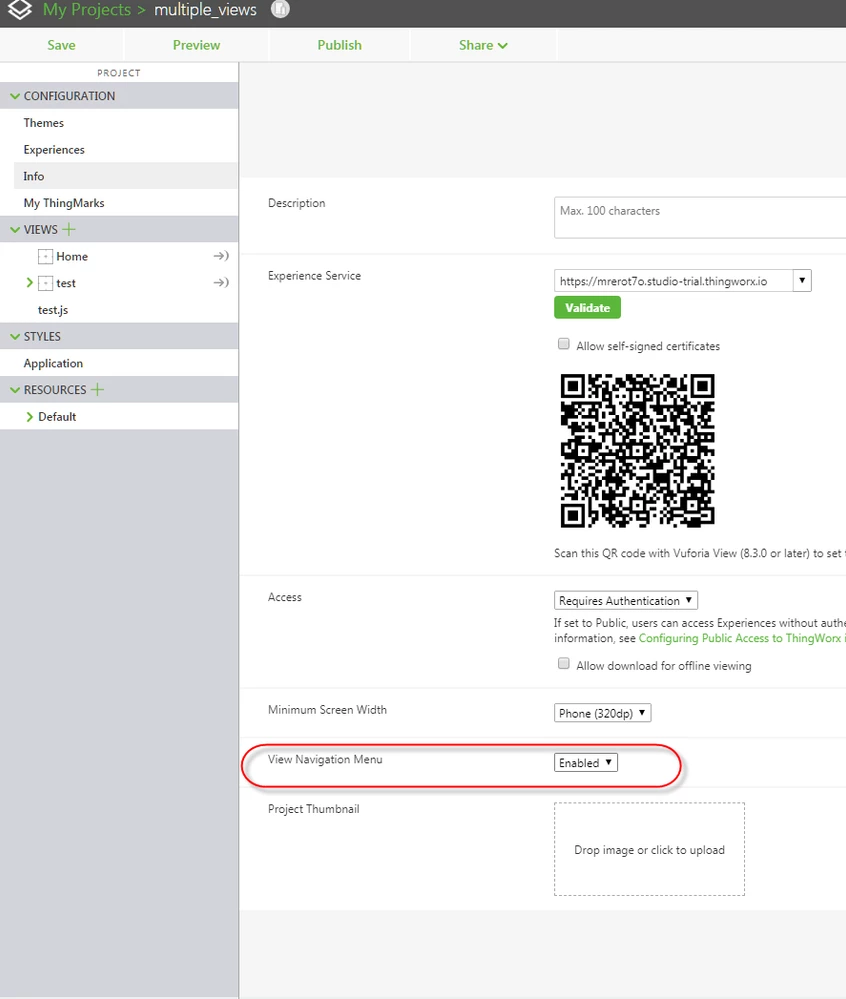
Please follow these steps :

  1. In Vuforia Studio, in your Project
  2. In PROJECT panel, in CONFIGURATION section, in Info menu
  3. In the View Navigation Menu list, select Hidden item
  4. Click Save button


vuforia_studio_hide_menu.png


Best regards,

Samuel

1 reply

sdidier17-PeridotAnswer
17-Peridot
June 14, 2019

Hello Ramo,


Please follow these steps :

  1. In Vuforia Studio, in your Project
  2. In PROJECT panel, in CONFIGURATION section, in Info menu
  3. In the View Navigation Menu list, select Hidden item
  4. Click Save button


vuforia_studio_hide_menu.png


Best regards,

Samuel

RAMO1-VisitorAuthor
1-Visitor
June 14, 2019

Thank you very much Samuel.