15-Moonstone
July 4, 2022
Solved

change application domain from localhost

  • July 4, 2022
  • 1 reply
  • 1105 views

Hello, due to CORS policy restrictions I would like to change where vuforia studio is executed in the browser from "localhost:3000" to "user.companydomain.local:3000".

how to do that?

Best answer by DmitryTsarev

Seems that by default Vuforia Studio only listens on localhost / 127.0.0.1 interface.

The behaviour is defined in 'AppData\Roaming\VuforiaStudio\studio-download.vuforia.io\dist\server\index.js' file on line 128


var listenInterface = args.listen || process.env.LISTEN_ON || 'localhost';


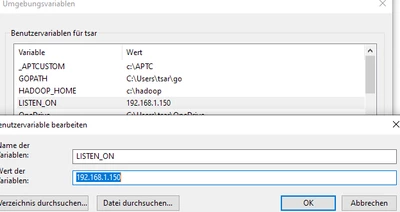
So you can just add a 'LISTEN_ON' environment variable (preferred) or overwrite the variable in the .js file (it will probably be overwritten on the next Studio upgrade). Will probably have to restart Studio after setting the vartiable.


There is probably a third way - adding an argument to the Studio start command, but I never cared to find it.


Unbenannt.PNG

1 reply

17-Peridot
July 4, 2022

Seems that by default Vuforia Studio only listens on localhost / 127.0.0.1 interface.

The behaviour is defined in 'AppData\Roaming\VuforiaStudio\studio-download.vuforia.io\dist\server\index.js' file on line 128


var listenInterface = args.listen || process.env.LISTEN_ON || 'localhost';


So you can just add a 'LISTEN_ON' environment variable (preferred) or overwrite the variable in the .js file (it will probably be overwritten on the next Studio upgrade). Will probably have to restart Studio after setting the vartiable.


There is probably a third way - adding an argument to the Studio start command, but I never cared to find it.


Unbenannt.PNG