1-Visitor
February 4, 2021
Solved

checkbox does not fully shown

  • February 4, 2021
  • 2 replies
  • 2430 views

Hi, 


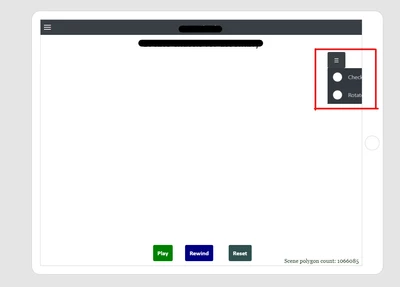
I have some checkbox in the right panel. When i preview the UI, the checkbox are not fully shown.


How can I solve this issue?
 

AS_9764990_0-1612422460701.png


Best answer by ClayHelberg

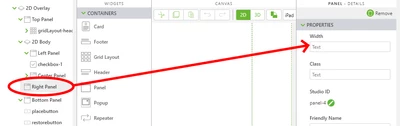
It looks like you have put these controls into the Right Panel in your 2D view. You may need to adjust the width of that panel to allow the full control to be visible.

ClayHelberg_0-1612465398342.png

Try setting this to 200px or 250px and see if that fixes your problem.

2 replies

17-Peridot
February 4, 2021

Hello,


I have a question ;


  • How the Widgets are located ?
  • Is it by a css stylesheet or by a Grid Layout Widget?

By using a specific and custom css class, it might be possible to aligned that at right or/and to use width propertie.

More details here:

https://www.w3schools.com/css/css_align.asp

https://www.w3schools.com/css/css_dimension.asp


If it is Grid Layout Widget used, it is possible to use Fixed Column Size, JustificationMargin and Content Wrap properties to change that.

More details here :

http://support.ptc.com/help/vuforia/studio/en/#page/Studio_Help_Center%2FWidgetPropertyPanel.html%23wwID0EQGDS

http://support.ptc.com/help/vuforia/studio/en/#page/Studio_Help_Center%2FWidgetGridLayout.html%23


  • is it helping you?


Best regards,

Samuel


AS161-VisitorAuthor
1-Visitor
February 5, 2021

Yes, I really appreciate it. thank you for your help 🙂 

18-Opal
February 4, 2021

It looks like you have put these controls into the Right Panel in your 2D view. You may need to adjust the width of that panel to allow the full control to be visible.

ClayHelberg_0-1612465398342.png

Try setting this to 200px or 250px and see if that fixes your problem.

AS161-VisitorAuthor
1-Visitor
February 5, 2021

thank you for your help 🙂 

18-Opal
February 5, 2021

You're welcome, glad it worked for you!