14-Alexandrite
February 20, 2019
Solved

Click coordinates

  • February 20, 2019
  • 3 replies
  • 2363 views

Hello friends,


please how is possible to access coordinate values pageX and pageY (position of a click) which are shown in Console log?
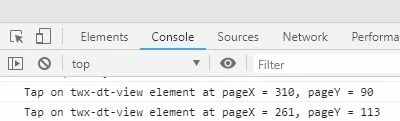
Screen_380.jpg

Thanks for the answers.


Tomas

Best answer by mn1

You can get them if you add an event listener:


window.addEventListener('click', $scope.clickEventFunktion);


In the function you can get the coordiates of the click event:


$scope.clickEventFunktion=function(){

console.log(window.event.pageX);

console.log(window.event.pageY);

}


3 replies

mn11-VisitorAnswer
1-Visitor
February 20, 2019

You can get them if you add an event listener:


window.addEventListener('click', $scope.clickEventFunktion);


In the function you can get the coordiates of the click event:


$scope.clickEventFunktion=function(){

console.log(window.event.pageX);

console.log(window.event.pageY);

}


21-Topaz I
February 21, 2019

Another version of the mention functionality in the replay of @mn1 

document.addEventListener('click', function(event) {console.log("click() 1 called");
 $scope.lastClick = {
 x: event.pageX, y: event.pageY};
});

So in this case you can save the value of the click listerner to an $scope parameter and use it later outside the click event e.g. in  ion-popover-view devinition.

14-Alexandrite
February 21, 2019

Thank you for advice @mn1 and @RolandRaytchev 


both methods works fine. I chose this way:


var ClickX = 0;
var ClickY = 0;
var width = 0;
var height = 0;

$scope.clickEventFunction = function(){
ClickX = window.event.pageX;
ClickY = window.event.pageY;
width = window.innerWidth;
height = window.innerHeight;
/**/
console.info('Coordinates: x=' + ClickX + ' y=' + ClickY + ' DisplaySize: ' + width + 'x' + height);
}

Regards


Tomas
