

1-Visitor
February 18, 2019
Question

Creating a sequence

  • February 18, 2019
  • 1 reply
  • 4484 views

Hi there,


I have two questions. I am relatively new in the use of vuforia studio and now trying to use sequences in my experience. Within the course "Fundamentals of AR Development with Vuforia Studio" (link) there is a pretty good example (5.8-5.11). This one did work for me as well!


Now I tried the same way to use my own Model. The Problem is, that I don't know where to get the path for the value. Opening the .pvz file as zip, it only shows the name, not the whole path.
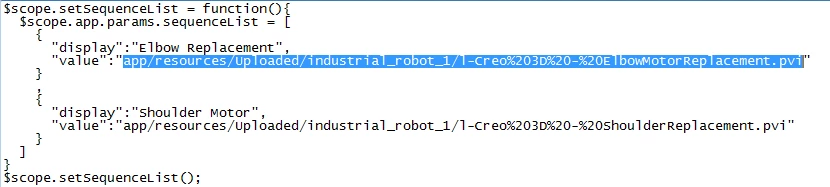
 

Unbenannt.PNG


Just for a quick proof, I also tried the easy and short method, explained in the help center (link), since there is no .js use but only drag and drop. The problem is now, that even following this instruction step by step, the preview function only shows the selection (yes, including the sequence names), but it's not possible to play them. Do you have an idea, where the problem is? The click-event is bound correctly to the model, which seems to be the most obvious possibility.


Thanks in advance for your help.


1 reply

17-Peridot
February 18, 2019

Hello,


This method is not update now for your use case.


We used this method in a first release of Vuforia Studio because .pvi files (Sequences) were not be read inside .pvz file.

It was needed to extract them manually from .pvz file and upload it in Vuforia Studio.


Now, we don't recommand this way.

I would recommand approch explains in this help center page :

http://support.ptc.com/help/vuforia/studio/en/#page/Studio_Help_Center%2FTutorialSequenceList.html%23


As you said, a drag and drop is just needed to populate the Select Widget.


To play the Sequence, it is needed to have a binding between the Select Widget and the Property in 3D Model.

It is the step 9. 


  • Do you have this binding ?
  • Do you a button to start to play Sequence selected ?


Best regards,

Samuel


UserX1-VisitorAuthor
1-Visitor
February 18, 2019

Hi Samuel, 


Thank you for the quick response. As you can see in my second link, I did also follow the instructions of the link you just postet (well, in german, but going through, it seems to be the same). So yes, unfortunately I have this binding and a play button, incl. correct binding. Thats why I tried to figure out my mistake.


To be sure, I also used a model from the lesson mentioned above (the robot arm model) and it also didn't work out. I also tested the following, to ensure, that it's not the animation, which failed: http://support.ptc.com/help/vuforia/studio/en/#page/Studio_Help_Center%2FIntermediateHandsfreeAnimation.html%23 This did work properly. Any ideas?


Best Regards

Ferdinand


17-Peridot
February 18, 2019

Hello Ferdinand,


  • Is it possible to share your Project ?

         I would like to have a look on my workstation and test it.

         To be honest, I just have one other idea.

  1. In Preview, run Developper Tools (press F12 key)
  2. In Console, do some errors are reported ?


Best regards,

Samuel