1-Visitor
September 28, 2017
Solved

Creating training with thingworx studio

  • September 28, 2017
  • 1 reply
  • 2325 views

Hello,

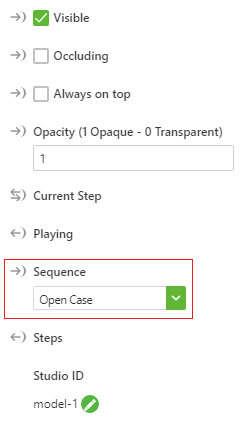
I am trying to create a training with thingworx studio for AR/VR. But I can only select one sequence. I would like to advance to the next step only after giving a voice command or a gesture.

How to add multiple steps in thingworx studio? Should the Steps or Sequence be binded?

Best answer by motti10

This is what you need to do.

  1. You need to change the pvz to zip,
  2. Remove the *.pvi files, rename the zip back to pvz and copy the pvi to the Uploaded resource file  or upload them


In Javascript , reference each pvi by function

$scope.yourFunctionNamePVI1 = function() {

$scope.view.wdg['model-1']['sequence'] = 'app/resources/Uploaded/[yourpvi]';

  $timeout(function() {

    $scope.$broadcast('app.view["Home"].wdg["model-1"].svc.play');

    $scope.$applyAsync()

  }

           , 2000);

}

$scope.yourFunctionNamePVI2 = function() {

$scope.view.wdg['model-1']['sequence'] = 'app/resources/Uploaded/[yourpvi2]';

  $timeout(function() {

    $scope.$broadcast('app.view["Home"].wdg["model-1"].svc.play');

    $scope.$applyAsync()

  }

           , 2000);

}

Now you can gesture or click and execute the function to play your sequence of your choice.

You do not need to choose a default PVI for model

1 reply

motti105-Regular MemberAnswer
5-Regular Member
September 28, 2017

This is what you need to do.

  1. You need to change the pvz to zip,
  2. Remove the *.pvi files, rename the zip back to pvz and copy the pvi to the Uploaded resource file  or upload them


In Javascript , reference each pvi by function

$scope.yourFunctionNamePVI1 = function() {

$scope.view.wdg['model-1']['sequence'] = 'app/resources/Uploaded/[yourpvi]';

  $timeout(function() {

    $scope.$broadcast('app.view["Home"].wdg["model-1"].svc.play');

    $scope.$applyAsync()

  }

           , 2000);

}

$scope.yourFunctionNamePVI2 = function() {

$scope.view.wdg['model-1']['sequence'] = 'app/resources/Uploaded/[yourpvi2]';

  $timeout(function() {

    $scope.$broadcast('app.view["Home"].wdg["model-1"].svc.play');

    $scope.$applyAsync()

  }

           , 2000);

}

Now you can gesture or click and execute the function to play your sequence of your choice.

You do not need to choose a default PVI for model

lmalladi1-VisitorAuthor
1-Visitor
September 28, 2017

thank you, that worked