

Display sequence step names from Creo Illustrate
This example briefly describes how you can use the Step names that you used in Creo Illustrate sequence definitions to drive a corresponding step instruction/description in your experience. This is an unsupported, preliminary solution - R&D is working on a better, final solution. But as long as this is not available, you can use this one for PoC and demo purposes.
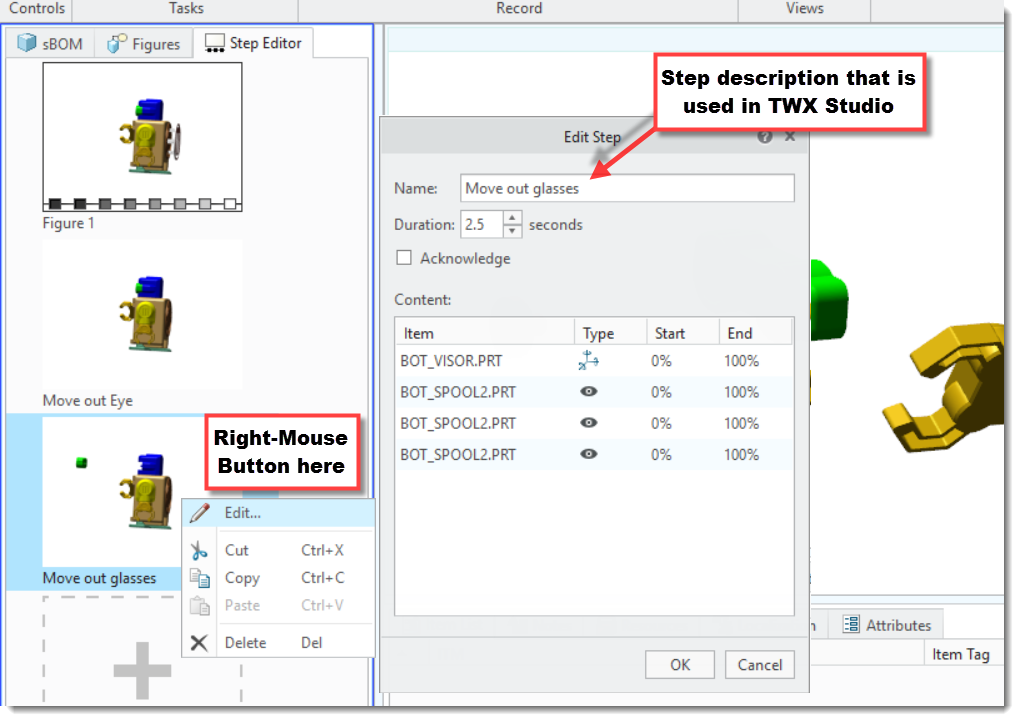
To setup the scene: Here is what I meant with Step names that you used in Creo Illustrate:
Now in Thingworx Studio you want to have the following result:
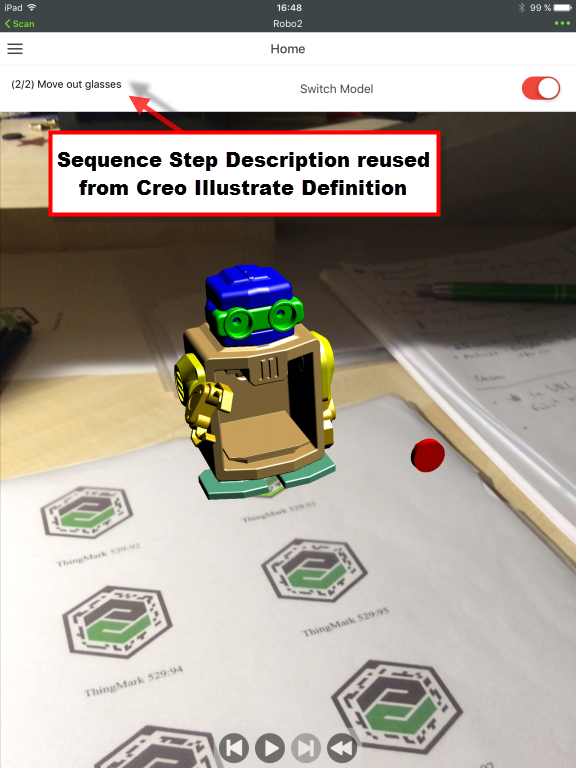
The text is rendered with a simple Label widget. You'll have to remember the ID of this widget for the following javascript tweak. Add the following text to the Javascript section of your View:
var labelId = "label-1"; // ID of the Label widget that displays the Step progress and description text
// this $on event handler switches the label based on the the sequence definition
// the arg variable is of the following form: (<step #>/<total step #) <step name>
$scope.$on('newStep', function(evt, arg) {
$scope.setWidgetProp( labelId, "text", arg); // get the currentStep from the arg
});
Now you only need to provide the correct initial value in the Label widget text property and add control widgets (Buttons, Playback) to drive your animation and you're done.
Easy!