I think the reason is the current implementation of these different areas.
1.)So if you want to access a widget and set properties the default method should be :
...
//for some 2d elements
$scope.view.wdg['textArea-1']['text']='test text';
$scope.view.wdg['textArea-1']['visible']=true;
// but also for 3d elements
$scope.view.wdg['3DLabel-1']['text']="----";
$scope.view.wdg['model-1']['sequence'] = 'app/resources/Uploaded/l-Creo 3D - TestFigure1.pvi';
...
2.)another powerful method to set properties will be $scope method setWidgetProp - example:
...
//to set the currentStep of model-1 to 4
$scope.setWidgetProp('model-1', 'currentStep', 4);
...
3.) in some case as you mention, you can use getElementById() but there is no guarantee that it should work , because it depends to the object what you will get here. For 3d object seems this to work , but it is better to use the angular.element -> example:
//reseting the model sequence
angular.element(document.getElementById('model-1')).scope().reset();
...
4.) what always will work is a query using the querySelector:
// accessing the 3d model
var element = angular.element(document.querySelector('twx-widget[widget-id=\"model-1\"] twx-dt-model'));
element.scope().play();
...
//playing a audio -2d element
var wdg = angular.element(document.querySelector('twx-widget[widget-id=\"audio-1\"] audio'));
wdg[0].play();
...
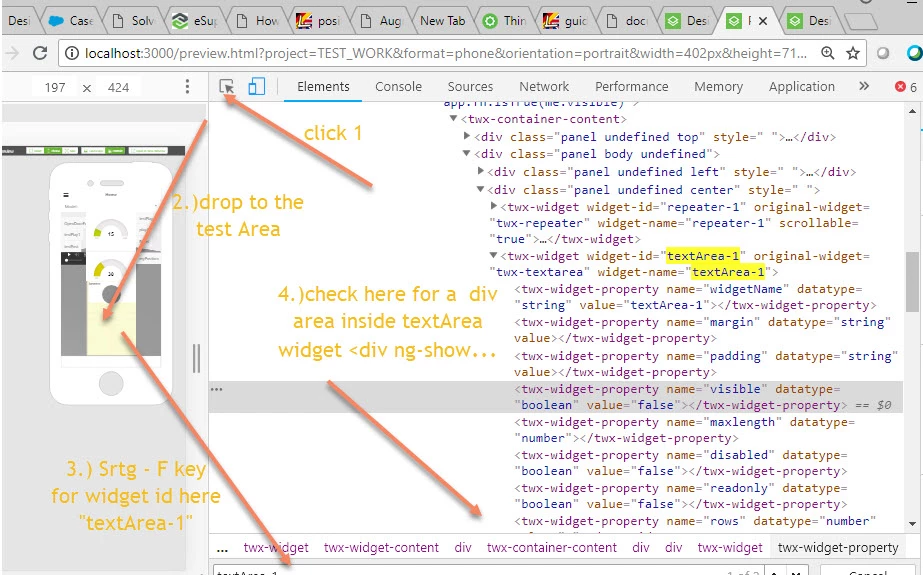
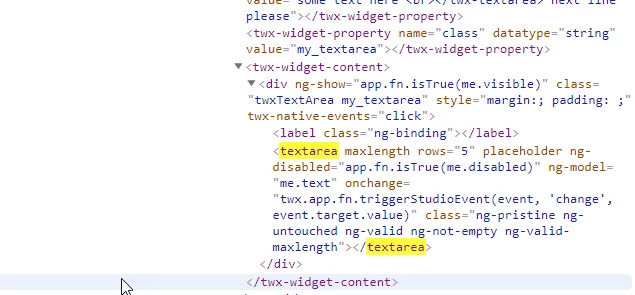
So the question is now how to get the correct query for element where I do not know the elements name.
Lets check here to a 2d element text area
thanks
-Roland