1-Visitor
December 11, 2017
Solved

Dynamic Model Load With Sequence

  • December 11, 2017
  • 1 reply
  • 3725 views

Hello together,

I have a question in regards to play sequences with ThingWorx Studio and Dynamic Model Loading.

I have 2 PVZ inserted in one experiences with the help of the dynamic Model Load (selector)

How is it possible to play a sequence from the model chosen by the dropdown?

Thank you for your help on this.
Best answer by ytella

Hi @K_Borrmann,

One way to achieve this scenario is as follows:

  • Drag and drop 2 button widgets on to the 2D canvas.
  • In both the Button properties:
    • UnCheck the Visible property .
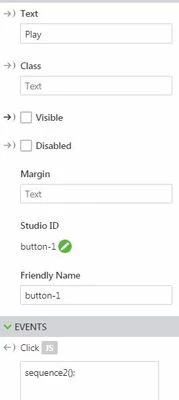
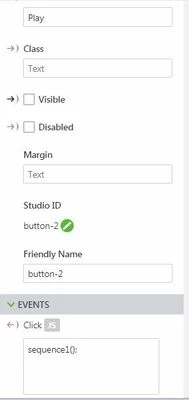
    • Click on JS next to click event and call the functions as shown below:

      Button1.JPGbutton2.JPG
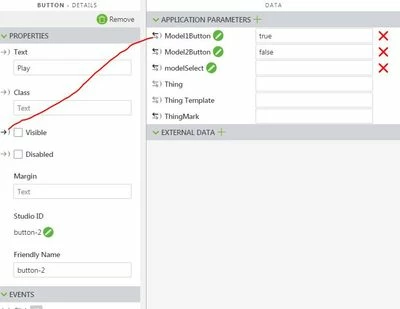
  • In the Data panel, add 2 application parameters. For example, add Model1Button and set it's value to true and add Model2Button and set it's value to false.
  • Drag the binding icon infront of Model1Button and drop it on the visible propert of Button 1.
  • Modle1.JPG
  • Similarly, drag the binding icon infront of Model2Button and drop it on the visible propert of Button 2.
  • Click on Home.js and paste the below code:

    $scope.sequence1 = function() {
    $scope.view.wdg['model-1']['sequence'] = 'l-Creo 3D - Disassembly-Sequence.pvi';
    angular.element(document.getElementById('model-1')).scope().playAll();
    $scope.app.params.Model1Button = false;
    $scope.app.params.Model2Button = true;
    };

    $scope.sequence2 = function() {
    $scope.view.wdg['model-1']['sequence'] = 'teardown.pvi';
    angular.element(document.getElementById('model-1')).scope().playAll();
    $scope.app.params.Model1Button = true
    $scope.app.params.Model2Button = false
    }

  • Save and test the experience.

1 reply

ytella17-PeridotAnswer
17-Peridot
April 3, 2018

Hi @K_Borrmann,

One way to achieve this scenario is as follows:

  • Drag and drop 2 button widgets on to the 2D canvas.
  • In both the Button properties:
    • UnCheck the Visible property .
    • Click on JS next to click event and call the functions as shown below:

      Button1.JPGbutton2.JPG
  • In the Data panel, add 2 application parameters. For example, add Model1Button and set it's value to true and add Model2Button and set it's value to false.
  • Drag the binding icon infront of Model1Button and drop it on the visible propert of Button 1.
  • Modle1.JPG
  • Similarly, drag the binding icon infront of Model2Button and drop it on the visible propert of Button 2.
  • Click on Home.js and paste the below code:

    $scope.sequence1 = function() {
    $scope.view.wdg['model-1']['sequence'] = 'l-Creo 3D - Disassembly-Sequence.pvi';
    angular.element(document.getElementById('model-1')).scope().playAll();
    $scope.app.params.Model1Button = false;
    $scope.app.params.Model2Button = true;
    };

    $scope.sequence2 = function() {
    $scope.view.wdg['model-1']['sequence'] = 'teardown.pvi';
    angular.element(document.getElementById('model-1')).scope().playAll();
    $scope.app.params.Model1Button = true
    $scope.app.params.Model2Button = false
    }

  • Save and test the experience.
1-Visitor
July 7, 2018

Hi @ytella

what is to be done if i have more than two sequences?


17-Peridot
August 1, 2018

Hi @M_shah,

I apologize for the delay. We can define javascript functions in the Home.js file as mentioned in the above post to load each sequence file and call these functions on the click event of the respective buttons.