Hi @K-Schaedel,
unfortunately I do not have currently a Microsoft Surface device . So I tested it further on Dell Windows 10 and on Android
When on android I opened one time with Excel and I have an Excel app on the device it opened always after downloading the file in the Excel app
On windows when I clicked the link (file widget) it did only downloads the file to the download default location. But when I first select the downloaded file and select the option always open this file:
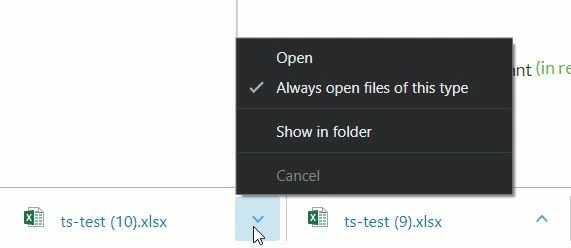
So, this will open then always the excel file when excel is already installed on the device
But when I try to save the file it will try to save it to the location where excel did open it - mean the download folder. It will never have a reference to the Vuforia view folder e.g. app/resources/Uploaded/ts-test.xlsx
For example, you can check the reference on the file click event
$scope.testlink= function()
{
var file_folder= $scope.view.wdg['file-1']['url'] ;
//... do some action with this file_folder
}
But there is no trivial API there to notify excel to use this path (it is relative and required to know the location of the app folder)


