
1-Visitor
March 19, 2024
Question

ePlan eView Issues with HoloLens 2

  • March 19, 2024
  • 2 replies
  • 1622 views

Good morning,


We are using ePlan eView to display 3D panels in AR. We recently acquired a HoloLens 2 as it was mentioned on Vuforia's support page that this was supported and that Vuforia View could be installed on it.


The issue we are having is that when you scan a QR code from ePlan eView, it then takes you to a log in page.
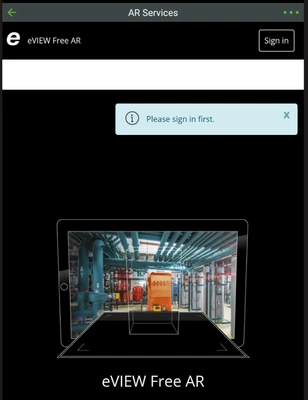
 

AI_10997663_0-1710856382787.png


This works fine in mobile devices, but the login page does not load in the HoloLens Vuforia View app.

AI_10997663_1-1710856403777.png

None of the content other than the white bar shows in the Vuforia View app in the HoloLens.
 

AI_10997663_2-1710856431365.jpeg

Because I can't log in to eView, I can't load the model. What can I do???? I need to get this working.


2 replies

15-Moonstone
March 19, 2024

If you use the same QR code as the mobile device (tablet or phone) it will not work, since they have a display where you can press the 2D UI buttons. AR experiences for the Hololens need a UI with 3D buttons.


This means the creator of the ePlan Experience needs to use a different template to create it.

1-Visitor
March 19, 2024

Thanks for your response. Not the response I was hoping but makes sense. I'm hoping I can escalate this with ePlan and get this working soon.

15-Moonstone
March 19, 2024

The ePlan Experience looks quite complex, it would take a lot of work to get everything running on the Hololens, maybe you're lucky and they have a beta version ready to try out.

4-Participant
March 20, 2024

Hi. I'm from EPLAN dev team.

We do not support eyewear.

eVIEW AR is designed and published for mobile devices only.


Please see the system requirements:

FAQs EPLAN eVIEW Free

21-Topaz I
March 20, 2024

@glajci , thanks to the EPLAN team  for participating on the Vuforia Communty!