15-Moonstone
March 21, 2022
Solved

Explode model from source code (without illustrate)

  • March 21, 2022
  • 1 reply
  • 1420 views

Hello,
I would like to create a slider that can perform the explosion of the 3D model. I know this is possible by working on creo illustrate and exporting the new pvz with moving sequences. Anyway, I would like to execute it without using Creo Illustrate since the pvz comes from remote resource load. Is it possible to create an "automatic" explosion sequence directly from the source code?

Best answer by RolandRaytchev

Hello @GianVal ,

so far , this should be  possible but   ...   you need to implement some mechanism that will check if there is some overlapping of geometry - intersections of parts when they are moved etc..  To implement this could requires some more complex considerations and at the end could  be more difficult (I never check it to estimate it most of the cad systems provides this functionality )  -> you need to know the information of the bounding box of the root assembly respectively the subassemblies and all the parts so they could be moved without overlapping. 

Another question is if you already defined modelItem widgets or you want to define an explode  state without explicit widget definition - this also should be possible. So you can create a list with movements which could be applied to the components (selections:  modelWidgetName+"-" + componentPath)

Here is a simple example which shows how to set a property of a model components. In this case you need first to prepare a list of all components where properties should be changed and in this list you need to specify the property to set (for explode state you need in fact only the the translations  "x", "y" and "z" 

Here a sample of property definitions property1.json:

{"3DLabel-1":{"visible":true,"text":"This is test2 Ventil ASM"},"model-1-/12":{"color":"rgba(255,0,0,1.0);","hidden":true},"model-1-/21/11":{"color":"rgba(0,0,250,1.0);","hidden":false},"model-1-/7":{"color":"rgba(0,0,128,1.0);","z": 0.0,"rz":0.0},"model-1-/26":{"color":"rgba(200,150,20,1.0);"},"model-1-/21/7":{"color":"rgba(0,255,0,1.0);","hidden":false,"x":0.0},"model-1-/19":{"color":"rgba(255,200,0,1.0);"},"model-1-/30":{"color":"rgba(0,30,200,1.0);","hidden":true},"model-1-/21/13":{"color":"rgba(128,0,128,1.0);","hidden":false},"model-1-/19":{"color":"rgba(255,0,100,1.0);","hidden":false},"model-1-/21/17":{"color":"rgba(0,0,255,1.0);","hidden":false,"x":0.0,"y":-0.02,"opacity":0.7},"model-1-/21/18/1":{"color":"rgba(0,0,255,1.0);","hidden":false,"x":0.0},"model-1-/27":{"color":"rgba(0,230,0,1.0);"},"model-1-/28":{"color":"rgba(100,100,0,1.0);"}}	

to apply this list we need some javascript code like this e.g.:

$scope.app.loadPropertyJson= function(fileJson) {
doRead('app/resources/Uploaded/'+fileJson);
};
....
....
$scope.jsonData={}; //global $scope variable

gotJSON=function(data){
 try{
$scope.jsonData=JSON.parse(data);
 console.warn( JSON.stringify($scope.jsonData))
 $scope.setMutipleProps($scope.jsonData)
 } 
catch(wrong){ console.warn(wrong);}

}
doRead=function (jsonFile){
fetch(jsonFile)
 .then(response=>response.text())
 .then(data=>gotJSON(data))
}
//-------------------
$scope.setMutipleProps = function(obj){

 Object.keys(obj).forEach(function (item) {

 for(var prop in obj[item]) {
 if( ! isModelItemSelection(item)) {
 $scope.view.wdg[item][prop]=obj[item][prop]; 
 //print the setting for debugging 
			 console.log("WDG SET==>$scope.view.wdg["+item+"]["+prop+"]="+obj[item][prop] )
 		$scope.$applyAsync();}
 else{
 //tml3dRenderer.setProperties(item, {prop:obj[item][prop]} );
 //tml3dRenderer.setProperties(item, {hidden:true} );
 var my_obj={};
 my_obj[prop]=obj[item][prop];
 //tml3dRenderer.setProperties(item, JSON.parse("{"+prop+":"+obj[item][prop]+"}") );
 console.warn("obj => "); console.warn( my_obj )
 switch(prop) {
 	case "hidden"	: tml3dRenderer.setProperties(item, my_obj );console.log("hidden ");break;
 case "opacity"	: tml3dRenderer.setProperties(item, my_obj );console.log("opacity ");break;
 // case "phantom"	: tml3dRenderer.setProperties(item, my_obj );console.log("phantom ");break;
 // case "decal"	: tml3dRenderer.setProperties(item, my_obj );console.log("decal ");break;
 case "color"	: tml3dRenderer.setColor(item, my_obj[prop] );console.log("setColor ");break;
 	case "x"		: tml3dRenderer.setTranslation(item,parseFloat(my_obj[prop]),0.0,0.0 );
 					 console.log("setTranslation ");break;
 		case "y"		: tml3dRenderer.setTranslation(item,0.0,parseFloat(my_obj[prop]),0.0 );
 					 console.log("setTranslation ");break;
 		case "z"		: tml3dRenderer.setTranslation(item,0.0,0.0,parseFloat(my_obj[prop]) );
 					 console.log("setTranslation ");break;
 	case "rx"		: tml3dRenderer.setRotation(item,parseFloat(my_obj[prop]),0.0,0.0 );
 					 console.log("setRotation ");break;
 		case "ry"		: tml3dRenderer.setRotation(item,0.0,parseFloat(my_obj[prop]),0.0 );
 					 console.log("setRotation ");break;
 		case "rz"		: tml3dRenderer.setRotation(item,0.0,0.0,parseFloat(my_obj[prop]) );
 					 console.log("setRotation ");break;
 case "scale"	: tml3dRenderer.setScale(item,parseFloat(my_obj[prop]),parseFloat(my_obj[prop]),parseFloat(my_obj[prop]) );
 					 console.log("setScale ");break;
 
 $scope.$applyAsync();
 default: console.log("prop : "+prop+" is not used");
 }
 console.log("SEL SET==>tml3dRenderer.setProperties("+item+",{"+prop+":"+obj[item][prop]+"}" )
 } } 
 
 							})

$scope.$applyAsync();
};
 

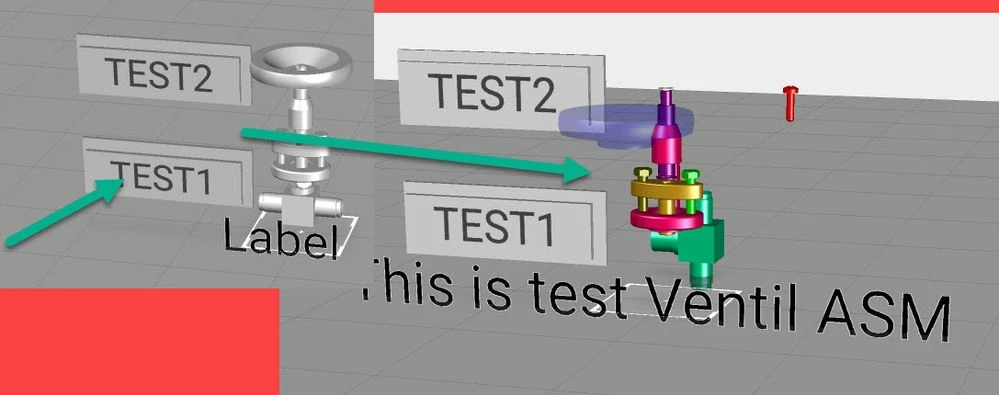
e.g. when we call this code of test assembly this will set the properties according to the list file .json
2022-03-22_13-21-11.jpg

I attached the test project to this post so you can check it. Thanks

1 reply

21-Topaz I
March 22, 2022

Hello @GianVal ,

so far , this should be  possible but   ...   you need to implement some mechanism that will check if there is some overlapping of geometry - intersections of parts when they are moved etc..  To implement this could requires some more complex considerations and at the end could  be more difficult (I never check it to estimate it most of the cad systems provides this functionality )  -> you need to know the information of the bounding box of the root assembly respectively the subassemblies and all the parts so they could be moved without overlapping. 

Another question is if you already defined modelItem widgets or you want to define an explode  state without explicit widget definition - this also should be possible. So you can create a list with movements which could be applied to the components (selections:  modelWidgetName+"-" + componentPath)

Here is a simple example which shows how to set a property of a model components. In this case you need first to prepare a list of all components where properties should be changed and in this list you need to specify the property to set (for explode state you need in fact only the the translations  "x", "y" and "z" 

Here a sample of property definitions property1.json:

{"3DLabel-1":{"visible":true,"text":"This is test2 Ventil ASM"},"model-1-/12":{"color":"rgba(255,0,0,1.0);","hidden":true},"model-1-/21/11":{"color":"rgba(0,0,250,1.0);","hidden":false},"model-1-/7":{"color":"rgba(0,0,128,1.0);","z": 0.0,"rz":0.0},"model-1-/26":{"color":"rgba(200,150,20,1.0);"},"model-1-/21/7":{"color":"rgba(0,255,0,1.0);","hidden":false,"x":0.0},"model-1-/19":{"color":"rgba(255,200,0,1.0);"},"model-1-/30":{"color":"rgba(0,30,200,1.0);","hidden":true},"model-1-/21/13":{"color":"rgba(128,0,128,1.0);","hidden":false},"model-1-/19":{"color":"rgba(255,0,100,1.0);","hidden":false},"model-1-/21/17":{"color":"rgba(0,0,255,1.0);","hidden":false,"x":0.0,"y":-0.02,"opacity":0.7},"model-1-/21/18/1":{"color":"rgba(0,0,255,1.0);","hidden":false,"x":0.0},"model-1-/27":{"color":"rgba(0,230,0,1.0);"},"model-1-/28":{"color":"rgba(100,100,0,1.0);"}}	

to apply this list we need some javascript code like this e.g.:

$scope.app.loadPropertyJson= function(fileJson) {
doRead('app/resources/Uploaded/'+fileJson);
};
....
....
$scope.jsonData={}; //global $scope variable

gotJSON=function(data){
 try{
$scope.jsonData=JSON.parse(data);
 console.warn( JSON.stringify($scope.jsonData))
 $scope.setMutipleProps($scope.jsonData)
 } 
catch(wrong){ console.warn(wrong);}

}
doRead=function (jsonFile){
fetch(jsonFile)
 .then(response=>response.text())
 .then(data=>gotJSON(data))
}
//-------------------
$scope.setMutipleProps = function(obj){

 Object.keys(obj).forEach(function (item) {

 for(var prop in obj[item]) {
 if( ! isModelItemSelection(item)) {
 $scope.view.wdg[item][prop]=obj[item][prop]; 
 //print the setting for debugging 
			 console.log("WDG SET==>$scope.view.wdg["+item+"]["+prop+"]="+obj[item][prop] )
 		$scope.$applyAsync();}
 else{
 //tml3dRenderer.setProperties(item, {prop:obj[item][prop]} );
 //tml3dRenderer.setProperties(item, {hidden:true} );
 var my_obj={};
 my_obj[prop]=obj[item][prop];
 //tml3dRenderer.setProperties(item, JSON.parse("{"+prop+":"+obj[item][prop]+"}") );
 console.warn("obj => "); console.warn( my_obj )
 switch(prop) {
 	case "hidden"	: tml3dRenderer.setProperties(item, my_obj );console.log("hidden ");break;
 case "opacity"	: tml3dRenderer.setProperties(item, my_obj );console.log("opacity ");break;
 // case "phantom"	: tml3dRenderer.setProperties(item, my_obj );console.log("phantom ");break;
 // case "decal"	: tml3dRenderer.setProperties(item, my_obj );console.log("decal ");break;
 case "color"	: tml3dRenderer.setColor(item, my_obj[prop] );console.log("setColor ");break;
 	case "x"		: tml3dRenderer.setTranslation(item,parseFloat(my_obj[prop]),0.0,0.0 );
 					 console.log("setTranslation ");break;
 		case "y"		: tml3dRenderer.setTranslation(item,0.0,parseFloat(my_obj[prop]),0.0 );
 					 console.log("setTranslation ");break;
 		case "z"		: tml3dRenderer.setTranslation(item,0.0,0.0,parseFloat(my_obj[prop]) );
 					 console.log("setTranslation ");break;
 	case "rx"		: tml3dRenderer.setRotation(item,parseFloat(my_obj[prop]),0.0,0.0 );
 					 console.log("setRotation ");break;
 		case "ry"		: tml3dRenderer.setRotation(item,0.0,parseFloat(my_obj[prop]),0.0 );
 					 console.log("setRotation ");break;
 		case "rz"		: tml3dRenderer.setRotation(item,0.0,0.0,parseFloat(my_obj[prop]) );
 					 console.log("setRotation ");break;
 case "scale"	: tml3dRenderer.setScale(item,parseFloat(my_obj[prop]),parseFloat(my_obj[prop]),parseFloat(my_obj[prop]) );
 					 console.log("setScale ");break;
 
 $scope.$applyAsync();
 default: console.log("prop : "+prop+" is not used");
 }
 console.log("SEL SET==>tml3dRenderer.setProperties("+item+",{"+prop+":"+obj[item][prop]+"}" )
 } } 
 
 							})

$scope.$applyAsync();
};
 

e.g. when we call this code of test assembly this will set the properties according to the list file .json

2022-03-22_13-21-11.jpg

I attached the test project to this post so you can check it. Thanks
