

1-Visitor
March 16, 2020
Solved

Facing problem while switching one model to another model

  • March 16, 2020
  • 1 reply
  • 6165 views

Hello,


I have nine pvz inside my project and each pvz contains the sequences. While moving from one model to other model other model is not getting hide it's visible due to it's sequences in to the list which is in playall mode. 


how to hide sequences in and show only model where i have given click event. 


I have attached snap shot for the reference.


Thank you Captureet.PNG
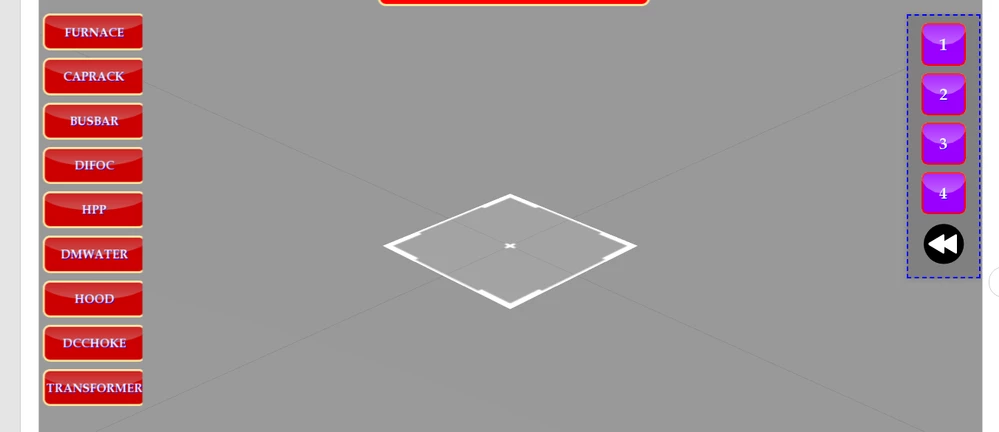
 

Model in button 1,2,3,4 remains as it is it's not reloading the pvz while again clicking on furnace. Even from furnace to next button when click event is trigger than model which is visible during the furnace button click is still visible in-spite of used js for hide the models.


Thank you 
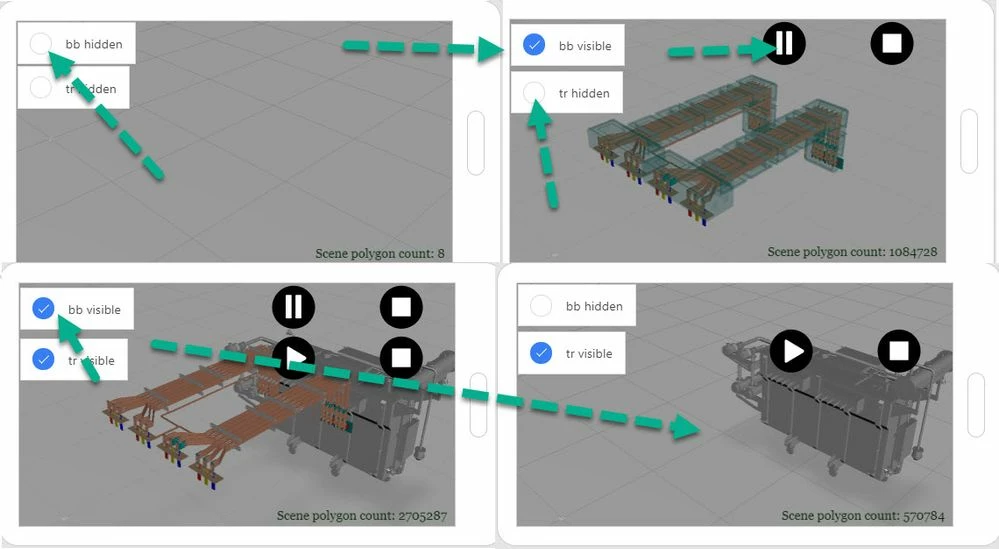


Best answer by RolandRaytchev

I checked your project and after some checks it was working - at least the problem with the display of the models - I will not fix generally your project - so I was only looking for the display with the background that it should be able to play a sequence

To get it working I needed simple to follow all suggestion from the previous posts in this topic. I attached the modified project so that you can test it now by yourself.

2020-04-11_0-01-10.jpg

1 reply

21-Topaz I
March 16, 2020

Hi @nraichura ,


possible options could be to set the sequence property to nothing and also possibly to set the model source to nothing if the hide of the model is not working .

Following actions could be done (via javaScript):

  • Set the model property to hide / visible = false/true


//model widget 'model-1'
$timeout(function () {
//set the forceHiden propery to true - only as additional option
$scope.setWidgetProp('model-1', 'forceHidden', true);
//or the same as calling this line below
//$scope.view.wdg['model-1']['forceHidden'] = true;
// set model to not visible
 
 $scope.$applyAsync(()=>{$scope.setWidgetProp('model-1', 'visbile', false); });

$scope.setWidgetProp('model-1', 'forceHidden', false);
},50);


In the example above set also the forceHidden property was set. This will, as the name say's,  "force" the setting of hide property (mostly of modelitems but also general). You do not need to use it in normal case , but you can try this setting as addtional option

  • you can also set /unset the sequence property of the model widget via Javascript:
    ...
    var modelName= 'model-1';
    $scope.$applyAsync(()=>{$scope.setWidgetProp(modelName, 'sequence', '');});
    ...​
    So here  above we will unset the sequence property, -this will make it more easy for setting of visible or to hide the model widget  or modelItem widgets of a specific model (pvz)
  • you can set different sequences / e.g. after replacing of the model source - pvz


...
var modelName='model-1';
var sequence = 'Figure 1';
$timeout(function () {
 $scope.$applyAsync(()=>{$scope.setWidgetProp(modelName, 'sequence', 'app/resources/Uploaded/l-Creo 3D - '+sequence +'.pvi');}); 
 },50);


here set the sequence to Figure 1

  • set the model source of a widget:
  • var modelName='model-2';
    var pvz= 'myTestModel.pvz';
    $timeout(function () {
     $scope.$applyAsync(()=>{$scope.setWidgetProp(modelName, 'src', 'resources/Uploaded/'+pvz);}); 
     },50);

so this above will set the model source. if you use pvz="";  in the code above - then this code will unset the model source of the modelWidget and will lead that the model is not visbible

I mentioned above different options which could be used as single action or in combination. For example:


//////////////
//definition of the function HOLO
$scope.app.playModelStepPvz = function (pvz,sequence,modelName,step_number,play) {
 //pvz file
 //sequnece -sequnece name e.g. TestFigure1 - as shown in UI
//modelName - model name e.g. model-1 widget
//step_number - set this number to current step
//play true/false execute play for the model
 
//first unset the model pvz
 $scope.$applyAsync(()=>{$scope.setWidgetProp(modelName, 'src', '');}); 

 
 $timeout(function () {
 $scope.$applyAsync(()=>{$scope.setWidgetProp(modelName, 'src', 'resources/Uploaded/'+pvz+'.pvz');}); 
 
 },50);
 

 //first unset the sequence
 $timeout(function () {
 $scope.$applyAsync(()=>{$scope.setWidgetProp(modelName, 'sequence', '');});
 
 },50);


 $timeout(function () {
 $scope.$applyAsync(()=>{$scope.setWidgetProp(modelName, 'sequence', 'app/resources/Uploaded/l-Creo 3D - '+sequence +'.pvi');}); 
 
 },50);

 $timeout(function () {
 
 $scope.$applyAsync(()=>{$scope.setWidgetProp(modelName, 'currentStep', parseInt(step_number));});
 
 if(play) //check if play should be applyed
 
 $timeout(function () {angular.element(document.getElementById(modelName)).scope().play(); }, 100)
 //angular.element(document.getElementById(modelName)).scope().play(); }, 100);
 }
 , 500);


};
....
...
//calling this when model is loaded
$rootScope.$on('modelLoaded', function() { 


//engine_test_exp-div-speed_High.pvz 
 $scope.setSequenceList();
$scope.app.playModelStep("engine_test_exp-div-speed_High","Figure 1","model-1",3,true)
 // to play engine_test_exp-div-speed_High.pvz, Figure 1 step number 3

})


For example with the  code above we can achieve  to play different sequences (pvi's) of different models (pvz's) using only  one model Widget ! Of course you can also set the modelWdiget x,y,z,rx,ry,rz properties if an aditional transformation / movement and rotation / is required

You can call any javaScript code from the click event or userpick event of any widgets. Example click event of the 'furnace' button


nraichura1-VisitorAuthor
1-Visitor
April 7, 2020

Hi,


I want to add following feature in my experience. 


1) Hide/Show pvz real time


can you share the javscript with example.


Thank you 

21-Topaz I
April 7, 2020

Hi @nraichura ,


what means hide/ show real time. Unfortunately for me is not clear  what this means.

So simple hide and show a pvz , you can do this simple by binding of the checkbox to the visible property of the model widget and this will also hide or show the model widget in real time. So, the question is what does mean here "real time "?

E.g. in the post I mentioned a javaScript code which more simplified could be packed into a function and then you can call this function form a button. Here it will hide the widget e.g. model-1 . It is possible to hide also a modelItem- means awidget which is a  component of the model widget.


$scope.myButtonFunction= function () {
$scope.$applyAsync(()=>{$scope.setWidgetProp('model-1', 'visbile', false); });
};


Then the function could be called form a button when you add the function   call to the click event  property:


2020-04-08_0-45-53.jpg