Best answer by RolandRaytchev

Hi @GianVal ,

you can use the mentioned technique also to load the Home.json. It is only a different path what could you  check in the project folder - e.g.:


 let my_file='Home.json'
 $http.get('app/components/' + my_file).
 success(function(data, status, headers, config) { console.log("-->calling succeeded");
 let myJsonData=data;// in this case is $scope.modelData['model-1']='Info.json';
 
 console.warn(myJsonData); 
 })
 .error(function(data, status, headers, config) {console.log("-->calling failed");
 });


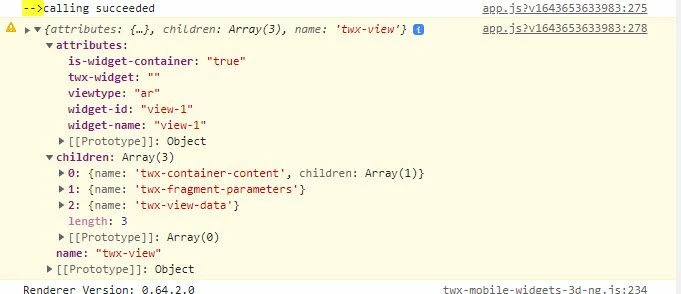
This will print the Home.json to the console in preview mode. e.g.:

2022-01-31_19-30-38.jpg

1 reply

21-Topaz I
January 31, 2022

Hi @GianVal ,

you can use the mentioned technique also to load the Home.json. It is only a different path what could you  check in the project folder - e.g.:


 let my_file='Home.json'
 $http.get('app/components/' + my_file).
 success(function(data, status, headers, config) { console.log("-->calling succeeded");
 let myJsonData=data;// in this case is $scope.modelData['model-1']='Info.json';
 
 console.warn(myJsonData); 
 })
 .error(function(data, status, headers, config) {console.log("-->calling failed");
 });


This will print the Home.json to the console in preview mode. e.g.:

2022-01-31_19-30-38.jpg

GianVal15-MoonstoneAuthor
15-Moonstone
March 17, 2022

Hi, I'm using this method to read an external JSON file. How can I use the retrieved file in the whole code as a "global variable"?

e.g. read a json-> get a JSON element to use in another function

Many thanks

21-Topaz I
March 17, 2022

without the check more detailed I think the following options could be used

  1. - in case that you will not change the json content you can load this json file each time you go to Stuidio View.
  2. - set the value to applicaiton parameter - so possibly you need to use JSON.stringify() and JSON.parse() when read and save there
  3. - use some of the available in Studio widget as container to save as text ( (e.g. unvisible or use  the text of tmlText widget etc) here is the same - so possibly you need to use JSON.stringify() and JSON.parse() when read and save there
  4. -or create an customized widget which should be container only 
  5. - use some TWX method to save the content to an repository and load later from repository