
13-Aquamarine
June 28, 2023
Solved

how I can make a dropdown list for multiple views within the same project.

  • June 28, 2023
  • 1 reply
  • 3396 views

Hello Roland @RolandRaytchev

Could you please advise how I can make a dropdown list for multiple views (within the same project).

I have a list of Views (30) that I want to be nested in a dropdown list. 

Thank you!

Continuation to topic
Best answer by IB_10645210

@RolandRaytchev 

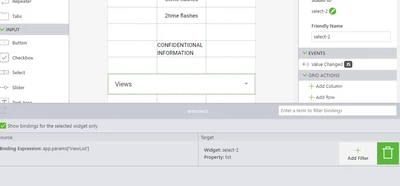
Hi, unfortunately, this solution didn't work.  I have checked the bindings but I can't see the issue.

Please advise/suggest a solution.


IB_10645210_0-1688560826184.png

1 reply

21-Topaz I
June 29, 2023

Hi @IB_10645210 ,

unfortunately I do not know how to get a list of all views by default functionality. What is possibly working is to find how many views are there defined by the project by calling something like this 


$scope.$on('$ionicView.afterEnter', function() {

if ($rootScope.$$listenerCount['$ionicView.afterEnter']>1) {
let num_views=$rootScope.$$listenerCount['$ionicView.afterEnter']
 console.info("We have more then one views = "+num_views)
}
});


so we can know how many views are defined in the vuforia Stuido project  but unfortunately I could not find a way to get a list of this views whiteout any preparations

What could be a possible preparation. One json file which contains the list of all defined views is this one: 'appConfig.json' which is located in the root Vuforia Studio project folder. So possibly when in a project I finished the definition of views , so I could copy this file to the upload folder and then could use some code like this:


$scope.$on('$ionicView.afterEnter', function() {
if ($rootScope.$$listenerCount['$ionicView.afterEnter']>1) {
let num_views=$rootScope.$$listenerCount['$ionicView.afterEnter']
 console.info("We have more then one views = "+num_views)
$scope.loadFile('appConfig.json');
}
});


where the $scope.loadFile() is defined as (also other auxiliary functions)  :


////////////////////////////////////////////////////////
////////////////////////////////////////////////////////
$scope.loadFile = function(my_file){
 
 var nameFile = "app/resources/Uploaded/" + my_file;
 var xmlhttp = new XMLHttpRequest();
 xmlhttp.open("GET", nameFile, true);
 xmlhttp.responseType = "blob";
 
 xmlhttp.onload = function() {
 var fileReader = new FileReader();
 fileReader.onload = function() {

 var myFile = this.result;
 $scope.myFile=JSON.parse(myFile);//save to scope
 $scope.ViewsArray=JSON.parse(myFile).targets.phone.components;
 $scope.JsonListViews=[]
 for(var ob in $scope.ViewsArray)
 {
 let item = $scope.ViewsArray[ob]
 let my_lst_item=new List_items("ViewName:"+item.name+"<>viewType:"+item.viewType,item.name)
 $scope.JsonListViews.push(JSON.parse(JSON.stringify(my_lst_item)))
 }
 $scope.app.params.ViewList=$scope.JsonListViews;
 $scope.$applyAsync();
 };
 fileReader.readAsText(xmlhttp.response);
 };
 xmlhttp.send();
}
////////////////////////////////////////////////////////
// this the object for the filling the list
function List_items(display,value) {
 this.display = display;
 this.value = value;
 return this;}
////////////////////////////////////////////////////////
$scope.clickList= function(wdgName){
//this is the function for the click on the list to navigate to view
let view = $scope.getWidgetProp(wdgName,'value')
$scope.navigate(view)
}
////////////////////////////////////////////////////////


So the mentioned functions will read the json file and create a list with the views and set it to a app parameter which could be linked to any list widget in any views. Here example for this :

2023-06-29_11-23-50.jpg

21-Topaz I
June 29, 2023

Here attached the demo project where I tested this: DynModelChangeUIcommunity_new.zip

13-Aquamarine
June 29, 2023

Thank you so much!