
14-Alexandrite
Jul 30, 2018 6:47 AM UTC
Solved

How to add streamlines from Creo Flow Analysis?

After seeing the PTC Demo from LiveWorx of the Cirrus Vision Jet that had the streamlines around it in AR I would like to recreate a similar experience. https://twitter.com/LiveWorx/status/1011976485324795904 


How can we get the Streamlines from Creo Flow Analysis into Studio?

Is there a way to export those results to a PVZ or something like that?

If there is any other suggested method to reproduce a similar view that would be hugely appreciated.
16-Pearl
Aug 1, 2018 12:33 AM UTC

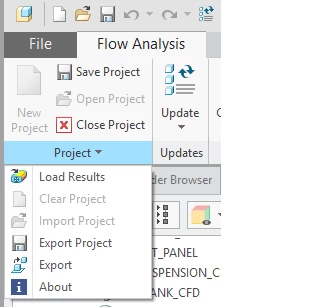
In the latest versions of Creo 5.0 (5.0.1.0) and Creo 4.0 (M050) there is the option to Export the streamlines from the results:


Untitled.png


This allows you to export an OBJ or a PVZ of the streamlines.  From what the PTC guys told me the rest of it is then done in Studio using some custom shaders, but I don't have the details on them unfortunately.


We've done some other work on this a while ago using the Vuforia SDK (now called Vuforia Engine) to bring in CFD results from ANSYS and overlay them on the physical product.  You can see examples here:

https://www.youtube.com/watch?v=KEwiUZLywgY

https://www.youtube.com/watch?v=bOMPkNYHhoA


Cheers,


Allan

5 replies

1-Visitor
Jul 30, 2018 6:56 PM UTC

I saw this demo at LiveWorx this yeah and was also really interested in it as I was trying to do the same thing with simulation data from Star CCM+ and not getting anywhere.


I have not tried this but i was told by the guy at the booth was that Simerics has an option to export the flow at a .obj object. Which is then really easy to import into Vuforia.

Translate
16-Pearl
Aug 1, 2018 12:33 AM UTC

In the latest versions of Creo 5.0 (5.0.1.0) and Creo 4.0 (M050) there is the option to Export the streamlines from the results:


Untitled.png


This allows you to export an OBJ or a PVZ of the streamlines.  From what the PTC guys told me the rest of it is then done in Studio using some custom shaders, but I don't have the details on them unfortunately.


We've done some other work on this a while ago using the Vuforia SDK (now called Vuforia Engine) to bring in CFD results from ANSYS and overlay them on the physical product.  You can see examples here:

https://www.youtube.com/watch?v=KEwiUZLywgY

https://www.youtube.com/watch?v=bOMPkNYHhoA


Cheers,


Allan

Translate
14-Alexandrite
Aug 1, 2018 7:39 AM UTC

Great thank you, not sure how I missed that.

Only problem I am having now is the streamlines are losing their colour.

My pvz files dont display in Studio while the OBJ files do. 

Translate
13-Aquamarine
Aug 9, 2018 5:52 AM UTC

Currently it is not possible to import or export the color data with .obj file in Creo Parametric.

Translate