Hi @zZzzZ ,
For the mobile devices you have first to test your experience in preview. If it doesn’t work in preview it won’t work in View. But unfortunately for the HoloLens2 that does not work so according to help for the 3D Video Widget
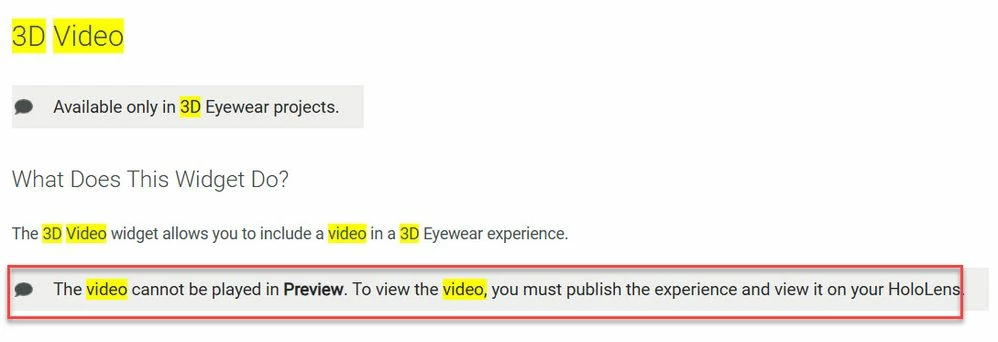
So means that you need to test it on the device- HL2
Please use the credentials for the repository owner for all login forms (Studio, TWX, and View) to eliminate privileges related issues from your test.
So according to the developer team you’re not supposed to use any services for this.
Could you please try the instructions below?
You only need to follow the instructions for PVZ files, but with the media content instead of a PVZ file.
Create a File Repository in ThingWorx
Edit the Thing Template and Things
Update the Vuforia Studio Experience
So for example I have a field in the repository myVideo as link :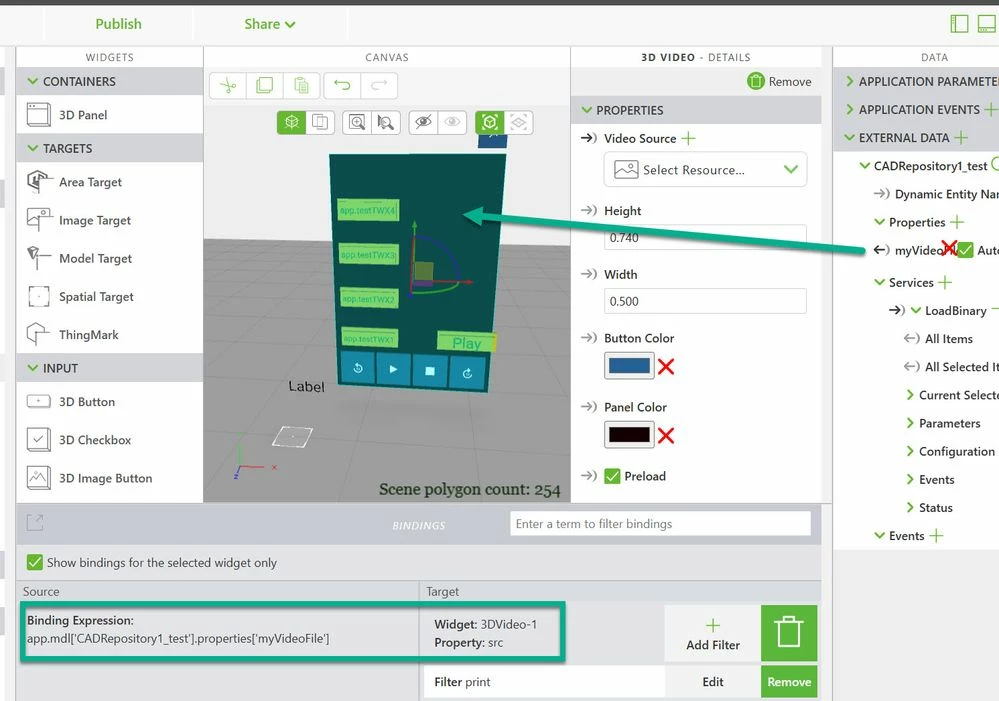
so above the usage of the myVideoFile TWX property /type==HyperLink/ which is added in Vuforia Studio to the External Data section.
That property is defined here in the Repository where the data is uploaded.
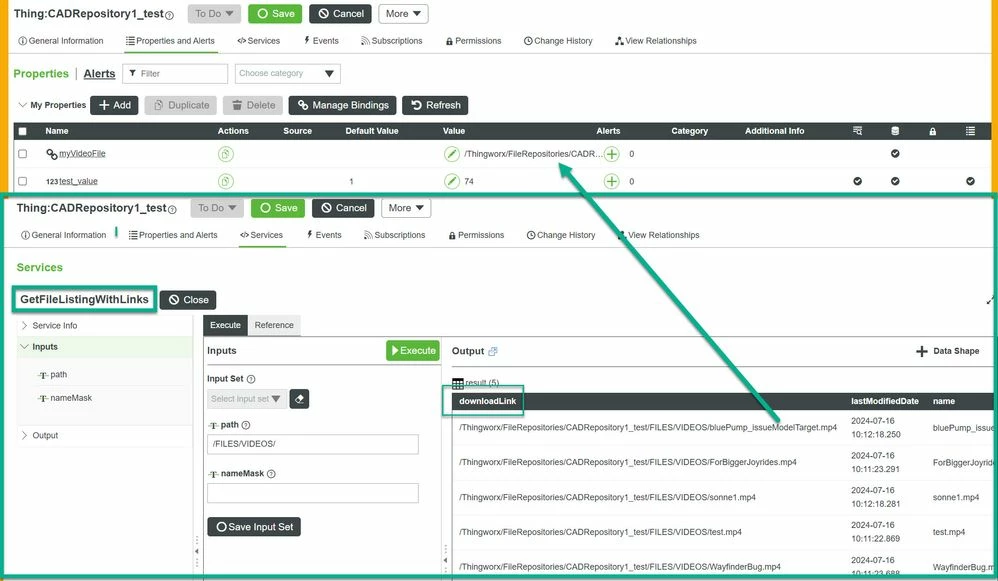
We can see that the value of the linkProperty has the syntax what is the output of the downloadLink field of the output /InfoTable/ of the GetFileListingWithLinks TWX service
Therefore I believe that you can use that syntax to set the resource property of the 3D video widget - e.g. some code like that :
 $scope.app.setThingWorxFile = (fullFilePath,widget,delay) => {
 $scope.view.wdg[widget].src=fullFilePath;
 $scope.$applyAsync();
 $timeout((w)=>{$scope.app.fn.triggerWidgetService(w,"play");
 },delay,false,widget)
 }
and e.g. when you call for btn 1-4 for 4 different videos the e.g. functions:
//=============
 $scope.app.testTWX1=()=>{
 $scope.app.setThingWorxFile ('/Thingworx/FileRepositories/CADRepository1_test/FILES/VIDEOS/WayfinderBug.mp4','3DVideo-1',2000);}
 //=============
 $scope.app.testTWX2=()=>{
 $scope.app.setThingWorxFile ('/Thingworx/FileRepositories/CADRepository1_test/FILES/VIDEOS/ForBiggerJoyrides.mp4','3DVideo-1',2000);}
 //=============
 $scope.app.testTWX3=()=>{
 $scope.app.setThingWorxFile ('/Thingworx/FileRepositories/CADRepository1_test/FILES/VIDEOS/sonne1.mp4','3DVideo-1',2000);}
 //=============
 $scope.app.testTWX4=()=>{
 $scope.app.setThingWorxFile ('/Thingworx/FileRepositories/CADRepository1_test/FILES/VIDEOS/bluePump_issueModelTarget.mp4','3DVideo-1',2000);}
/************************************************************************************
I want to mention that that code will work only if the permissions for the access of the repository thing are set correctly . Also the sample code is not really perfect - it will try to start play with some delay after setting of the vidoe resource . ...But when the delay is not long enough e.g. 2 seconds - so means in that time range the file is not loaded yet - then the play will be ignorred.

