
4-Participant
December 4, 2023
Solved

How to change the style of waypoints labels?

  • December 4, 2023
  • 2 replies
  • 2034 views

Hello dear PTC community,

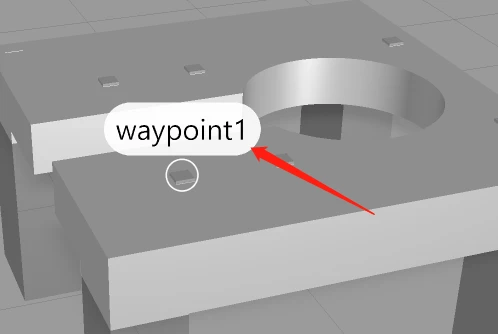
In my vuforia studio project, I found that the waypoints labels text is too big.

I need to change the waypoints labels, such as color,size etc.

Please advise how can I do it.

Thank you.
4141208.png

Best answer by ClayHelberg

You can affect some appearance characteristics by setting styles for the "waypoint-label" class, something like this:


.waypoint-label { font-family: serif; color: green; }

Unfortunately, none of the sizing attributes seem to have any effect--or rather, increasing the font size increases the size of the white background, but not the text itself.

2 replies

10-Marble
December 4, 2023

I don't know if there is a way to change wayfinder labels. I have always done this by creating my own 3D Labels in the same positions as corresponding waypoint, turn on the billboard option and change this Labels in CSS.

Pawel_D_0-1701697940268.png


4-Participant
December 5, 2023

Thanks for the reply.
There is a more convenient way in the solution.

Hope you can enjoy it.

18-Opal
December 4, 2023

You can affect some appearance characteristics by setting styles for the "waypoint-label" class, something like this:


.waypoint-label { font-family: serif; color: green; }

Unfortunately, none of the sizing attributes seem to have any effect--or rather, increasing the font size increases the size of the white background, but not the text itself.

4-Participant
December 5, 2023

That's is what i need! I tried it and it worked.

Thank you so much!

Best Regards

18-Opal
December 5, 2023

You're welcome, I'm glad it worked for you!