6-Contributor
June 29, 2023
Solved

How to Click on a Model Located at a Distant Position in HoloLens Experience

  • June 29, 2023
  • 1 reply
  • 3713 views

In the Hololens project, I would like to perform a click on a model that is located at a distant position.

Is it possible to designate distant models using gaze manipulation or other gestures?


I would like to achieve the ability to display multiple models in AR and, when clicking on a specific model among them, display the attribute information of the selected model.


Best answer by RolandRaytchev

@MarkConig thanks for the feedback! Your right and your feedback is helpful! So testing with thingmark I can reproduce the behavior as your described (also as @usami mentioned) Did not test it further with MT and AT but I think that I could rely that what you mentioned in your post is the current situation.

Also further check in PTC database I found the following article:

https://www.ptc.com/en/support/article/cs335925

https://www.ptc.com/en/support/article/cs387848

Especially the last one saying:

he Eye gaze cursor in Vuforia View for Hololens is not displayed after tracking a ThingMark or a Model Target
>>>
Description
==============
The Eye gaze cursor in Vuforia View for Hololens is not displayed after tracking a ThingMark or a Model Target
The Eye gaze cursor is shown in an Experience with Spatial Target

Resolution
=============
The Eye gaze cursor only appears when there is something that requires gaze+air tap to interact with. The cases where this is true are:
All experiences with a Spatial target, as the spatial manipulator buttons require gaze+air tap
Any experience that contains a widget when the Click event is bound or executes JS, except if the device is a Hololens2 and the only such Widget(s) are 3D buttons.

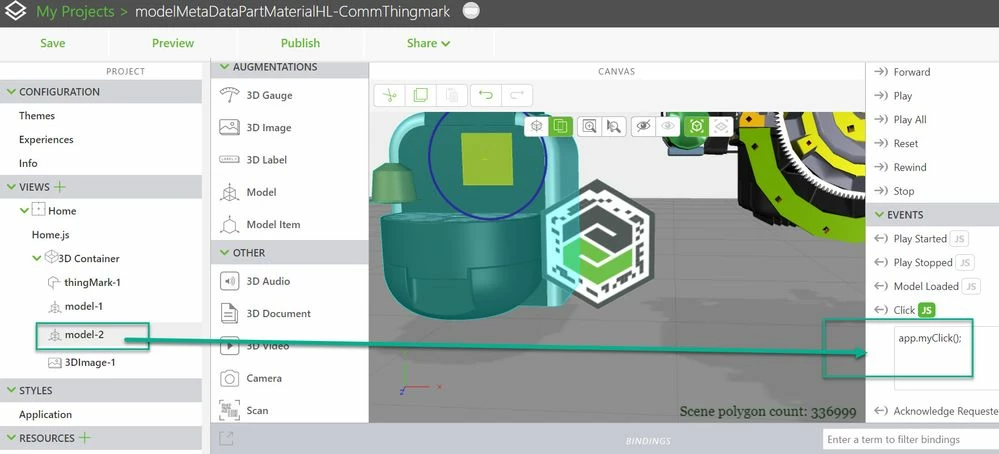
So following the logic on this article I simple defined e.g. the following dummy function on the same Project but with thingmark:

//----------------------------------------------------------------------
app.myClick=function(){
console.log("app.myClick();");
};

And added in the UI js box for the click event on the both model widgets (previous project attached on this topic)

Afterword's I tested it and it worked with thingmark as target - it shows again the gaze symbol2023-07-05_14-58-57.jpg
 

1 reply

21-Topaz I
June 29, 2023

Hi @usami ,

I am not sure if I understand correctly your requiriert , but if you need to click on model and then to receive further Information about this coponent e.g. form metadata or other source (Json file containing information ) then this is possible. You can e.g.  depending on the component selection display further documents , images or models .

Here is an project which demonstrate the principle for mobile platform. But it could be done the same for HoloLens :

2023-06-29_11-46-19.jpg

here I attached the demo project. So you can test it to see if this is something which possibly could be helpful to achieve your requirements


usami6-ContributorAuthor
6-Contributor
June 29, 2023

I would like to achieve exactly the same thing on the HoloLens.

Is the "userpick" event available on the HoloLens? Additionally, do I need to physically touch the target model with my finger to trigger that event?

I want to click on a model located far away in a situation where I can't move.

Is it possible to remotely click on a model using gaze or gestures?

21-Topaz I
June 29, 2023

Hi @usami ,

yes this should work on HL but need to be adapted to this device project typ. The problem is that some widgets (2d widget are not available on HoloLens device) therefore I just used a 3DImage file where I created a svg where the text was displayed and then set it to the image - not perfect but should demonstrate  that this works on HL device. OK I tested it only in preview , because today I do not have access to a  HL device . I attached the project for HL. Please, let me know if this is not working for you - so I will check it on HL device

2023-06-29_17-40-24.jpg
