
1-Visitor
October 30, 2025
Question

How to create an animation with multiple imported Analysis.pbk-Parts
  • October 30, 2025
  • 1 reply
  • 162 views

MA_10474971_0-1761857904850.png
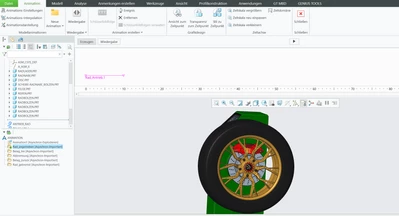
You see i want all these 5 Folderlike things, that include .pbk-Analysis I created in Mechanism in just one scale. But i can only open one in one scale right now and its impossible to create the desired flow in just one .pbk. So how can I put all 5 of them on this blank scale?


1 reply

14-Alexandrite
January 9, 2026

Hello User.


You created several animations in Creo Parametric. These are defined and stored in the assembly file (and as pbk). To answer your question, we need to know, what your goal is.

For example: to drive these animation into a Vuforia Studio experience, you need following steps:

  1. export each animation as FRA file (please note: FRA only supports the movements of the parts, no camera, hiding (blank) or any changes in transparency (opacity))
  2. you need creo illustrate and import the assembly (PVZ recommended)
  3. create minimum 1 figure with an animation, type sequence
  4. import the FRA file into the sequence step
  5. create a new step and import the next FRA file (repeat this for every FRA file)
  6. combine the steps or change your animations (e.g. when opacity is important, you have to recreate this. Also for changing color (appearances) or maybe switching to phantom (tbh, I prefer to simulate this with changing color and opacity, as this uses a fade rather than switching between two frames.)
  7. the usual steps → publish PVZ → using PVZ in model container

Two additional hints:

  • how to export FRA files:
    in animation, you would use → mwodarz_INNEO_0-1767943227353.png or mwodarz_INNEO_3-1767944355497.png

    in mechanism. you only need  → mwodarz_INNEO_1-1767943419109.png

    It is not necessary to use "design animation" only to animate the mechanisms (just export the FRA files and do the rest in Illustrate)

    Design animation in Creo Parametric helps in cases, when you want to create animated exploded views and / or interpolate between snapshots
  • how to import FRA into illustrate → mwodarz_INNEO_2-1767943639258.png


The screenshots were created in Creo Parametric 9 and Illustrate 12.1 with a german UI (on purpose. The english UI uses the same icons 😉 )


Hope that helps

CheerEO

Marco