14-Alexandrite
December 18, 2019
Solved

How to disable bookmarking in specific view?

  • December 18, 2019
  • 1 reply
  • 1622 views

Hello


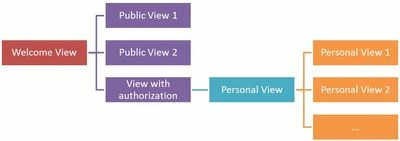
I tried to add bookmark to an expirience. When I open an expirience via this bookmark it started on a specific view  where was bookmark created (it does not start in initial view).


Is it possible to allow bookmarks only on initial view or disable/redirect bookmarking to specific view?


view structure.jpg


Regards

Tomas

Best answer by RolandRaytchev

Hi @TomasCharvat ,


I think the problem here is that the bookmark / in Vuforia View/ contains all this information. So means it depends on the last current location where you add the bookmark. So you can see this when you share the bookmark.

Example for the syntax :


https://view.vuforia.com/command/view-experience?url=https%3A%2F%2Fgallery.vuforia.io%2FExperienceService%2Fcontent%2Fprojects%2Fmissile-st%2Findex.html%3FexpId%3D1%23%2FHome


Here is an explicit specification of the view. So if you pay attention to generate all your bookmarks in the correct view this could , may be , help.

Otherwise possibly you can add in each view a listener - something like this


$scope.$on('$ionicView.beforeEnter', function(){
if($scope.app.params['VIEWCALLOK']=='false')
 twx.app.fn.navigate("YourStartView");
});


so that it will check if the parameter e.g.  VIEWCALLOK is true  . If false then it will navigate to your start view.

The parameter  could be set to true in the start view so that later the navigation to other views will work.

1 reply

21-Topaz I
December 18, 2019

Hi @TomasCharvat ,


I think the problem here is that the bookmark / in Vuforia View/ contains all this information. So means it depends on the last current location where you add the bookmark. So you can see this when you share the bookmark.

Example for the syntax :


https://view.vuforia.com/command/view-experience?url=https%3A%2F%2Fgallery.vuforia.io%2FExperienceService%2Fcontent%2Fprojects%2Fmissile-st%2Findex.html%3FexpId%3D1%23%2FHome


Here is an explicit specification of the view. So if you pay attention to generate all your bookmarks in the correct view this could , may be , help.

Otherwise possibly you can add in each view a listener - something like this


$scope.$on('$ionicView.beforeEnter', function(){
if($scope.app.params['VIEWCALLOK']=='false')
 twx.app.fn.navigate("YourStartView");
});


so that it will check if the parameter e.g.  VIEWCALLOK is true  . If false then it will navigate to your start view.

The parameter  could be set to true in the start view so that later the navigation to other views will work.

14-Alexandrite
December 19, 2019

Hello  RolandRaytchev


Thank you for answer. Described code works really good with little modifications for mine project.


Regards


Tomas