1-Visitor
February 5, 2021
Solved

How to disable the checkbox after user checked and uncheck if user click on reset button?

  • February 5, 2021
  • 1 reply
  • 4297 views

Hi,


I need to disable the checkbox after user checked the checkbox.I also need to uncheck and enable all the checkbox if user click on reset button. How can I do that?


Thank you in advance. 

Best answer by RolandRaytchev

Hi @KM_01 ,

this could be done with javaScript.

one possible option could be:

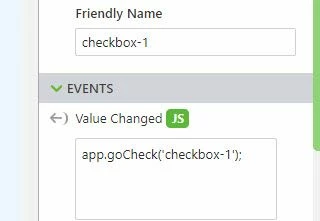
1.) from the checkbox Widgtets Value change event you can call the funciton e.g. goCheck which is defined somehow like this:


$scope.app.goCheck= function(checkboxname){
if($scope.view.wdg[checkboxname]['value'] == true){
$scope.view.wdg[checkboxname]['disabled']=true
} }


and then wirte in the UI box : for the checkbox  e.g.:
 

 2021-02-05_14-26-45.jpg

this will  work only for one checkbox where you add the call to the javascript box - disadvantage  of this solution -you need to add to every checkbox widget in UI the function with the specific name. I think it will be possible to have  a more general solution but it will be more complex

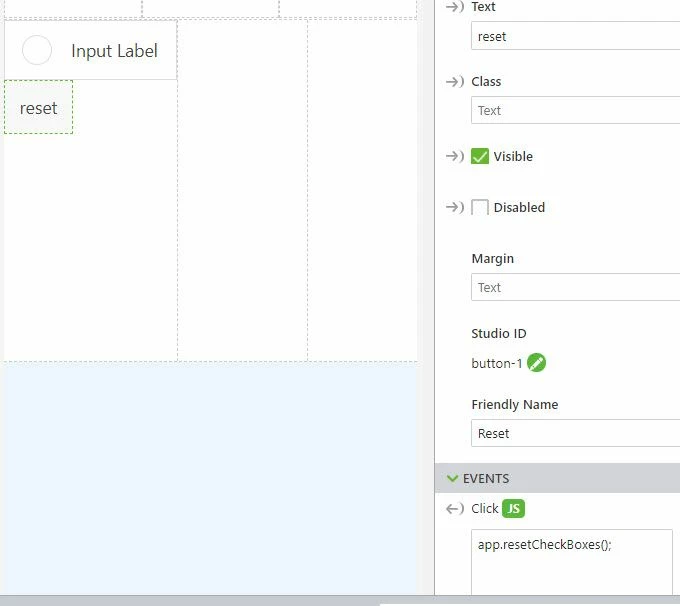
2.) regarding to the quesiton how to uncheck and enable all checkboxes -you could start form the restet button some code like this:


//===================
$scope.app.resetCheckBoxes=function()
{
 wdgs=$scope.view.wdg
Object.keys(wdgs).forEach(function(key) { 
 wdg = wdgs[key]
 console.warn(wdg)
 if ( wdg.widgetName.indexOf('checkbox') !=-1) {
 $scope.view.wdg[key]['value']=false;
	 $scope.view.wdg[key]['disabled']=false;
 
 $scope.$applyAsync();}})

}


and call the app.resetCheckBoxes(); from the UI Javascript box of Reset button 
 

2021-02-05_14-28-01.jpg

1 reply

21-Topaz I
February 5, 2021

Hi @KM_01 ,

this could be done with javaScript.

one possible option could be:

1.) from the checkbox Widgtets Value change event you can call the funciton e.g. goCheck which is defined somehow like this:


$scope.app.goCheck= function(checkboxname){
if($scope.view.wdg[checkboxname]['value'] == true){
$scope.view.wdg[checkboxname]['disabled']=true
} }


and then wirte in the UI box : for the checkbox  e.g.:


 2021-02-05_14-26-45.jpg

this will  work only for one checkbox where you add the call to the javascript box - disadvantage  of this solution -you need to add to every checkbox widget in UI the function with the specific name. I think it will be possible to have  a more general solution but it will be more complex

2.) regarding to the quesiton how to uncheck and enable all checkboxes -you could start form the restet button some code like this:


//===================
$scope.app.resetCheckBoxes=function()
{
 wdgs=$scope.view.wdg
Object.keys(wdgs).forEach(function(key) { 
 wdg = wdgs[key]
 console.warn(wdg)
 if ( wdg.widgetName.indexOf('checkbox') !=-1) {
 $scope.view.wdg[key]['value']=false;
	 $scope.view.wdg[key]['disabled']=false;
 
 $scope.$applyAsync();}})

}


and call the app.resetCheckBoxes(); from the UI Javascript box of Reset button 

 

2021-02-05_14-28-01.jpg

KM_011-VisitorAuthor
1-Visitor
February 8, 2021

Thank you
