how to get default experience service URL for Vuforia studio
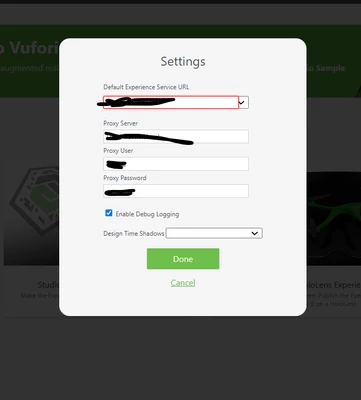
how to get an default experience service URL for Vuforia studio. i have installed vuforia experience server as well but its not getting populated anywhere.
how to get this done

how to get an default experience service URL for Vuforia studio. i have installed vuforia experience server as well but its not getting populated anywhere.
how to get this done
After you start Vuforia Studio, you can author experience project vial http://localhost:3000/home in Chrome or Edge.
If Vuforia Studio is on the same machine as Vuforia Experience Service (VES), you can set the URL of VES as below:
http(s)://localhost:2019
If "nossl" is set to true in configuration.json, here the protocol should be http, otherwise, it is https.
If Vuforia Studio is on a different machine, you can set the URL of VES as below:
http(s)://<IP address of the machine LP-PFIAX4nk>:2019
then, after you enter the project name and URL of VES, the Create button should become active and you will be able to create experiences.
Enter your E-mail address. We'll send you an e-mail with instructions to reset your password.