
14-Alexandrite
April 5, 2017
Solved

How to hide a part in an assembly ?

  • April 5, 2017
  • 1 reply
  • 6307 views

Hello all,

I would like to show and hide a part (in a model) when I click on a checkbox, how to do that ?

And I have the same question as before, but I was unanswered, how to play only a step in an illustrate animation ?

Thanks !
Best answer by katte

Selected is an event and it is supposed to bind with services, besides that, you can also directly bind the value property (of checkbox) to modelItem and in the pop-up you can select invisible.

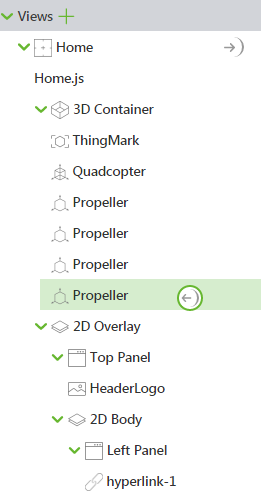
Yes it is possible to put a name on the part. Also, the drag-n-drop can be targeted to the name of the model-item in the left-panel, as shown below:

1 reply

5-Regular Member
April 5, 2017

You can drag a Model-Item on the desired part and bind the checkbox click to the Model-item's invisible property.

Let me know if that works.

-Giri

14-Alexandrite
April 5, 2017

When I am on the properties of the checkbox, and I drag the "Selected" value on the model-item, only services appears, how to bind to invisibility ?

Is that possible to put a name on the part instead a drag and drop, if the part is very small, it can be hard to find it.

katte5-Regular MemberAnswer
5-Regular Member
April 5, 2017

Selected is an event and it is supposed to bind with services, besides that, you can also directly bind the value property (of checkbox) to modelItem and in the pop-up you can select invisible.

Yes it is possible to put a name on the part. Also, the drag-n-drop can be targeted to the name of the model-item in the left-panel, as shown below: