13-Aquamarine
June 28, 2023
Solved

How to link/bind two projects (button within one project to the view in another project )

  • June 28, 2023
  • 1 reply
  • 1695 views

Hi Dear PTC Community,

Please, advise how to link the button within one project to the view within another project..

I assume it is a Javascript command but need some instructions,

Thank you 


Best answer by RolandRaytchev

Hi @IB_10645210 ,

lets suppose that we have:

1.) Vuforia Studio Project "A" where in a any View there is button which should call:

2.) Experience "B" - which have e.g. Home as start view and also the Views TEST1, TEST2 and TEST3  etc

and we want that we have to specify in the call that view TEST2 in B is called. 

I think is possible

In project A we have to define the function:

//url of the deepLink of Project B
$scope.UriTest='https%3A%2F%2Fmrerot7o.studio-trial.thingworx.io%2FExperienceService%2Fcontent%2Fprojects%2Fdynmodelchangeuicommunity%2Findex.html%3FexpId%3D1'
// the view of the proejct B which should be called
$scope.cVIEW="TEST2"
// this the function what should be called by the button
//it will call project B (specified by url - and then call view
$scope.callViewProject=function(url,view){
window.location.href='vuforiaview://ptc.com/command/view-experience?url='+url+'%3FVIEW%3D'+view
}
//----------------
$scope.TEST1=()=> {
$scope.callViewProject($scope.UriTest,$scope.cVIEW)
}
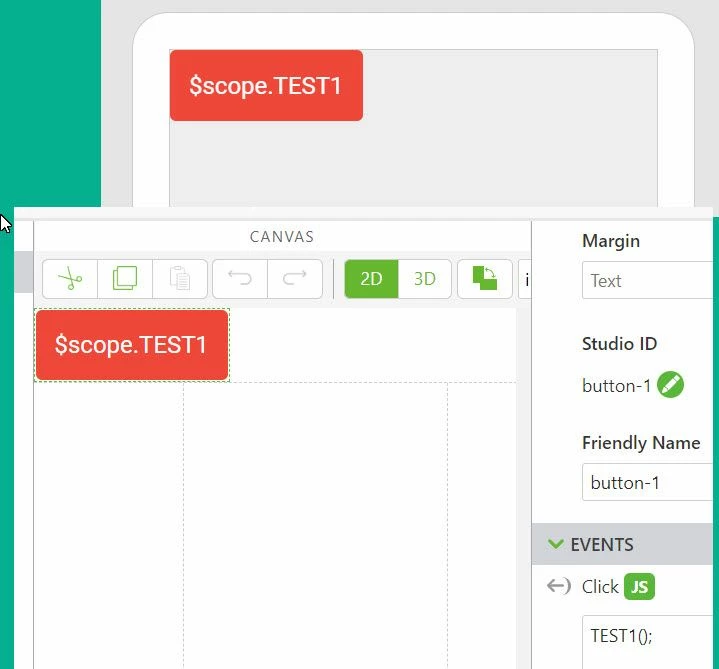
2023-06-29_16-18-30.jpg

This should be the call from Project A to B where we pass also as parameter the View which should be called here 'TEST2

E.g. the URL we can take from the deep Link  of "B" in the Share Tab Share Experience 
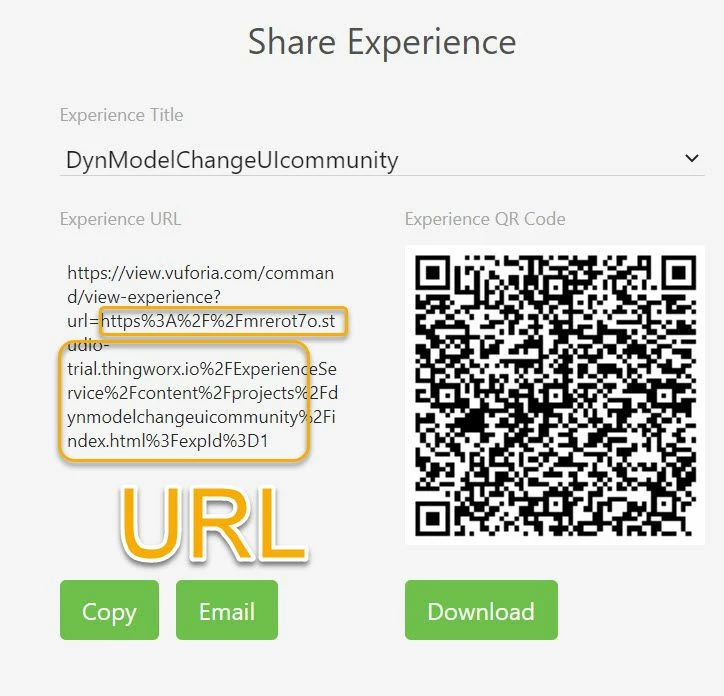
2023-06-29_16-24-40.jpg

So that is the part what we need to call from project A to call B->TEST2

1 reply

21-Topaz I
June 29, 2023

Hi @IB_10645210 ,

lets suppose that we have:

1.) Vuforia Studio Project "A" where in a any View there is button which should call:

2.) Experience "B" - which have e.g. Home as start view and also the Views TEST1, TEST2 and TEST3  etc

and we want that we have to specify in the call that view TEST2 in B is called. 

I think is possible

In project A we have to define the function:

//url of the deepLink of Project B
$scope.UriTest='https%3A%2F%2Fmrerot7o.studio-trial.thingworx.io%2FExperienceService%2Fcontent%2Fprojects%2Fdynmodelchangeuicommunity%2Findex.html%3FexpId%3D1'
// the view of the proejct B which should be called
$scope.cVIEW="TEST2"
// this the function what should be called by the button
//it will call project B (specified by url - and then call view
$scope.callViewProject=function(url,view){
window.location.href='vuforiaview://ptc.com/command/view-experience?url='+url+'%3FVIEW%3D'+view
}
//----------------
$scope.TEST1=()=> {
$scope.callViewProject($scope.UriTest,$scope.cVIEW)
}

2023-06-29_16-18-30.jpg

This should be the call from Project A to B where we pass also as parameter the View which should be called here 'TEST2

E.g. the URL we can take from the deep Link  of "B" in the Share Tab Share Experience 

2023-06-29_16-24-40.jpg

So that is the part what we need to call from project A to call B->TEST2

21-Topaz I
June 29, 2023

But we need also to handle the parameter in B when Project B is called then we need to check what of argument was passed to it.

Let say the Home view is the start view. Then we need in Home view to check the passed parameters and then navigate to the View which was passed e.g. TEST2

I used some code like this what I verified that worked on Android planform:

//////////////////////////// CODE ADDED to start View e.g. Home.js
$scope.$on('$ionicView.afterEnter', function() { 
//checking of parameters 
 $scope.app.params.CurrentURL = window.location.href;
 let str=$scope.app.params.CurrentURL 
 const words = str.split('VIEW=');
 if(words.length >1)
 {
 let next_words=words[1].split('#/')
 console.log(next_words[0]);
 let view= next_words[0]
 $timeout( ()=>{ 
 twx.app.fn.addSnackbarMessage("VIEW="+view,"twLogo");
 $scope.navigate(view)},100)
 } 
})
//---------------------view Enter End


13-Aquamarine
August 22, 2023

@RolandRaytchev 

Please advise how I can link multiple buttons within one project A  to multiple Views within another project B.

When I put my code for multiple buttons/labels(within project A) linked to multiple views ( within project B) all buttons drive me to the same last in a code View. It looks like Project A for some reason ignores code for the previous Views and sees only the last one( "RemovingRVcoil")

// $scope, $element, $attrs, $injector, $sce, $timeout, $http, $ionicPopup, and $ionicPopover services are available

//url of the deepLink of Project B
$scope.UriTest='h--------------------😁..thingworx.com%2FExperienceService%2Fcontent%2Fprojects%2Fmuz-fh09%2Findex.html%3FexpId%3D1'
// the view of the proejct B which should be called
$scope.cVIEW="DisassemblyRemovingtheCabinet"
// this the function what should be called by the button
//it will call project B (specified by url - and then call view
$scope.callViewProject=function(url,view){
window.location.href='vuforiaview://ptc.com/command/view-experience?url='+url+'%3FVIEW%3D'+view
}
//----------------
$scope.Removingcabinet=()=> {
$scope.callViewProject($scope.UriTest,$scope.cVIEW)
}


//url of the deepLink of Project B
$scope.UriTest='h--------------------😁..thingworx.com%2FExperienceService%2Fcontent%2Fprojects%2Fmuz-fh09%2Findex.html%3FexpId%3D1'
// the view of the proejct B which should be called
$scope.cVIEW="DisassemblyRemovingtheInverter"
// this the function what should be called by the button
//it will call project B (specified by url - and then call view
$scope.callViewProject=function(url,view){
window.location.href='vuforiaview://ptc.com/command/view-experience?url='+url+'%3FVIEW%3D'+view
}
//----------------
$scope.Removingtheinverterassembly=()=> {
$scope.callViewProject($scope.UriTest,$scope.cVIEW)
}

//url of the deepLink of Project B
$scope.UriTest='hh--------------------😁..thingworx.com%2FExperienceService%2Fcontent%2Fprojects%2Fmuz-fh09%2Findex.html%3FexpId%3D1'
// the view of the proejct B which should be called
$scope.cVIEW="DisassemblyRemovingtheinverterPC"
// this the function what should be called by the button
//it will call project B (specified by url - and then call view
$scope.callViewProject=function(url,view){
window.location.href='vuforiaview://ptc.com/command/view-experience?url='+url+'%3FVIEW%3D'+view
}

//----------------
$scope.RemovingInverterassemblyPCB=()=> {
$scope.callViewProject($scope.UriTest,$scope.cVIEW)
}

//url of the deepLink of Project B
$scope.UriTest='h--------------------😁.thingworx.com%2FExperienceService%2Fcontent%2Fprojects%2Fmuz-fh09%2Findex.html%3FexpId%3D1'
// the view of the proejct B which should be called
$scope.cVIEW="DisassemblyRemovingtheRVcoil"
// this the function what should be called by the button
//it will call project B (specified by url - and then call view
$scope.callViewProject=function(url,view){
window.location.href='vuforiaview://ptc.com/command/view-experience?url='+url+'%3FVIEW%3D'+view
}

//----------------
$scope.RemovingRVcoil=()=> {
$scope.callViewProject($scope.UriTest,$scope.cVIEW)
}