it seems that we can not achieve this only with property settings but possibly in combination with css style definitions - e.g. in the Applicaiton tab:
.test{
 width: 40px;
 height: 40px;
 background-color: skyblue;
 transform: rotate(-90deg) translateX(-400px);
 }
And we can set the test to the gridLayout which contain the repeater (will rotate and translate it) . The best value could be found after some tests.
For quick test I did have the following appearance:
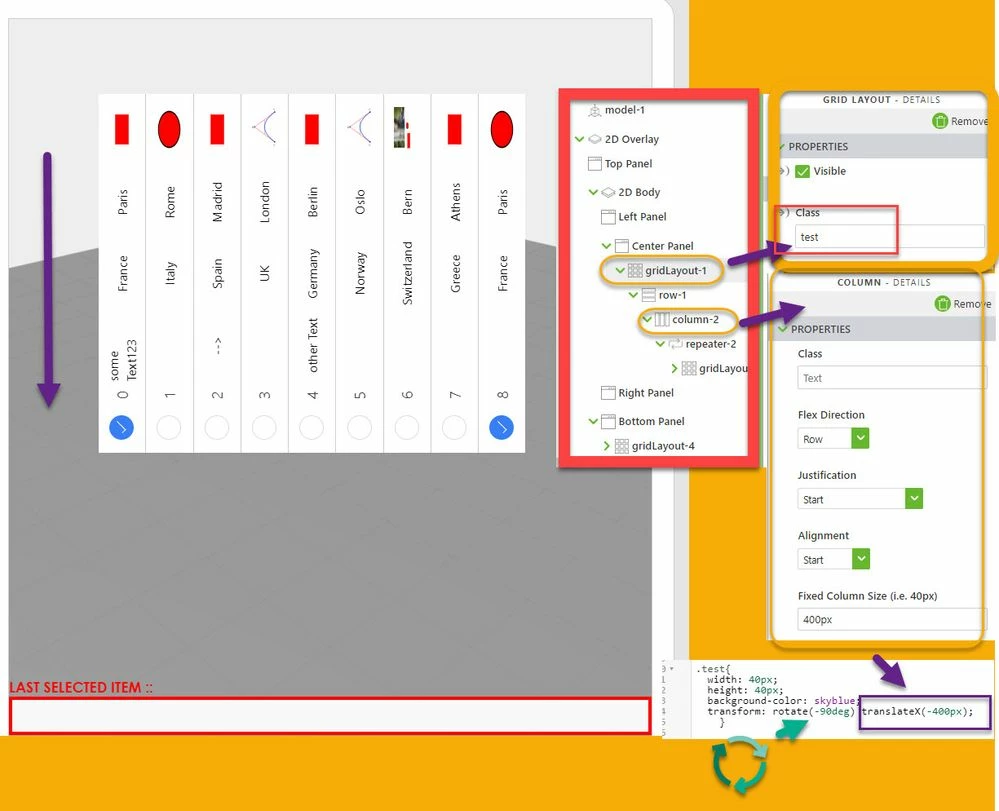
Of course, you can use some rotation also in sub elements e.g. repeater cells - for example you can rotate back the text again 90 degree if you want to have a horizontal texts but it will definitely require a number of tests when you want to achieve the desired appearance of your layout.


