Hi @nishihira ,
there are 2 different questions, possibly the second one is not clear expressed and need further clarification.
-Currently , so far I know , you could not create a new widget (eg. 3Dlabel) on mobile device when you are already in the view .
- to the second question - what you can do -> is to select all widgets from type 3Dlabels and to hide them -set visible attribute to false. -and later display only this one what you want to be visible. e.g the follow function could display all 3DLebels or to hide them - possibly this is one is the sub task what you want to implement:
//////=========================================================
function hasWdgProp(widget,property)
{
 	for (wp in widget)	{
 //console.log("property="+property+" | wp="+wp);
 if(wp==property) return true;
 else continue;
						}
}

//////========================================
$scope.hiddeAll3Dlabels=function(){
 var wdgs=$scope.app.view.Home.wdg;
 for(wdg in wdgs)
 {
 if(hasWdgProp(wdgs[wdg],'fontColor') && hasWdgProp(wdgs[wdg],'text') )
 { //3DLabel have property fontColor and text
 wdgs[wdg].visible=false;
 $scope.$applyAsync();
 } } };
//////========================================
$scope.displayAll3Dlabels=function(){
 var wdgs=$scope.app.view.Home.wdg;
 for(wdg in wdgs)
 {
 if(hasWdgProp(wdgs[wdg],'fontColor') && hasWdgProp(wdgs[wdg],'text') )
 { //3DLabel have property fontColor and text
 wdgs[wdg].visible=true;
 $scope.$applyAsync();
 } } };
//////========================================
Back to the question about dynamically create a widgets- there is only one option , I know , -> this is using tmlText widget but it works only on load of the view. I do not know how to activate this later. Possibly is there some mechanism, but the only one what was working for me was to left the view, change the list and then go back to the view.
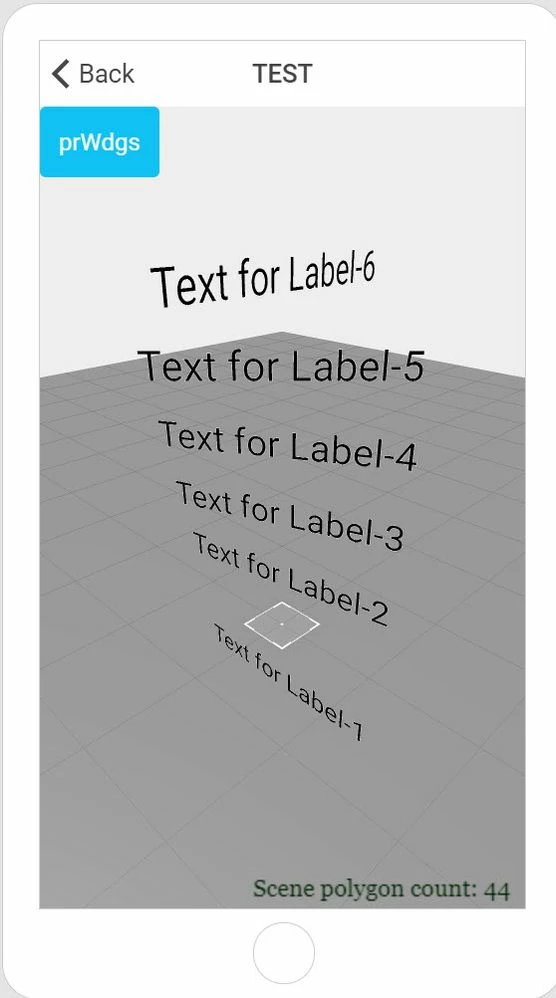
Here is an example , showing how you can create variables text labels when you enter a view - so you need to set a JSON List to an App parameter (it contains the properties)
//==================================================================================================================
$scope.myLabels = [
 { widgetid:"label-1", widgetname:"label-1" , text:"Text for Label-1",x:"0.1",y:"0.0",z:"0.1",ry:"0" },
 { widgetid:"label-2", widgetname:"label-2" , text:"Text for Label-2",x:"0.1",y:"0.2",z:"0.1",ry:"10" },
 { widgetid:"label-3", widgetname:"label-3" , text:"Text for Label-3",x:"0.1",y:"0.3",z:"0.1",ry:"20" },
 { widgetid:"label-4", widgetname:"label-4" , text:"Text for Label-4",x:"0.1",y:"0.4",z:"0.1",ry:"30" },
 { widgetid:"label-5", widgetname:"label-5" , text:"Text for Label-5",x:"0.1",y:"0.5",z:"0.1",ry:"45" },
 { widgetid:"label-6", widgetname:"label-6" , text:"Text for Label-6",x:"0.1",y:"0.6",z:"0.1",ry:"90" }
];
//===============================
$scope.goToTESTView= function(){
$scope.app.params.labellist=$scope.myLabels
 $scope.$applyAsync();
 $scope.navigate("TEST");

};
So this will set the data of the 3Dlabels to the app parameter myLabels and will then call View "Test" where we want to display these widgets.
In the TEST view we have a tmlText widget which has the following defection:
<div ng-repeat="lab in app.params.labellist">
<twx-dt-label id="{{lab.widgetid}}" widgetName="{{lab.widgetname}}" text="{{lab.text}}" scale="1" x="{{lab.x}}" y="{{lab.y}}" z="{{lab.z}}" rx="0" ry="{{lab.ry}}" rz="0"></twx-dt-label>
</div>
I attached a simple project showing this.
Also it seems that the 3DLabels are only displayed -means read only. For me there was no possible to modify these labels (e.g. to move or hide like a regular widget ) later inside the view- without to restart the view. possibly this requires further /better definition. Any recommendation are welcome.