

15-Moonstone
March 22, 2022
Solved

Isolate model item (not working in last vuforia studio version)

  • March 22, 2022
  • 1 reply
  • 1841 views

What is the best way to isolate the visibility of a model item, that is to make only a selected item visible via a button?
I have successfully used a combination of


tml3dRenderer.setProperties(modelitem, {hidden: true})


but the latest update seems to have broken this mechanism.
It does not work anymore. so I'm wondering what is the best way to select a component and then isolate it from the others.

Thank you


please note that I'm NOT using model items in Vuforia Studio, I only use metadata.json to retrieve the model parts.
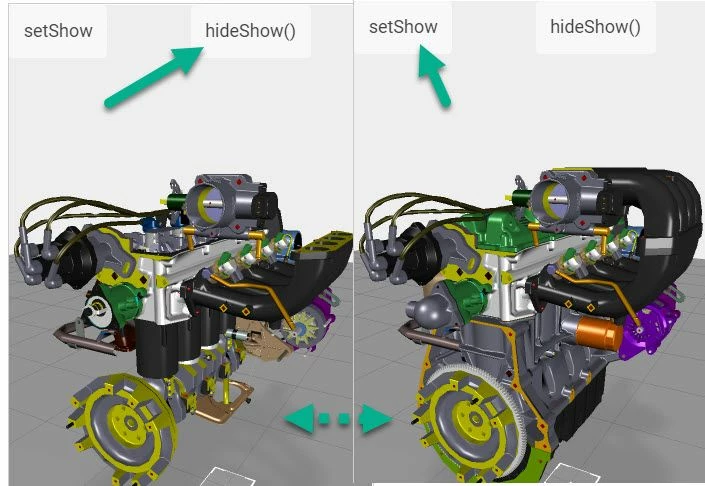
Best answer by RolandRaytchev

Tested the code in the latest Studio Version Version 9.3.2 (9.3.2.5397) preview mode and IOS IPad - was working fine. Attached the test project. Relevant code

//======================================
 isPreview = function() { 
 if(window.twx.app.isPreview()) // is in Preview
 return true;
 return false; }
//======================================
function hide3DObject(name) {
 if( isPreview())
 tml3dRenderer.GetObject(name).GetWidget().SetVisibility(false);
 else
 tml3dRenderer.setProperties(name,{ hidden:true} );
 $scope.$applyAsync();
}
//======================================
function show3DObject(name) {
 if( isPreview())
 tml3dRenderer.GetObject(name).GetWidget().SetVisibility(true);
 else
 tml3dRenderer.setProperties(name,{ hidden:false} );
 $scope.$applyAsync();
}
//======================================
$scope.setShow= function() {
console.warn("setShow()");
show3DObject('model-1-/0/0/3/2'); 
show3DObject('model-1-/0/0/9/4/1'); 
show3DObject('model-1-/0/0/4/1'); 
show3DObject('model-1-/0/0/1/7/1');
show3DObject('model-1-/0/0/1/4/65/3'); 
show3DObject('model-1-/0/0/1/1/1'); 
show3DObject('model-1-/0/0/4/4'); 
show3DObject('model-1-/0/0/1/1/18'); 
show3DObject('model-1-/0/0/1/9/1'); 
show3DObject('model-1-/0/0/10/2'); 
}

$scope.setHide= function() { 
console.warn("setHide()");
hide3DObject('model-1-/0/0/3/2'); 
hide3DObject('model-1-/0/0/9/4/1'); 
hide3DObject('model-1-/0/0/4/1'); 
hide3DObject('model-1-/0/0/1/7/1');
hide3DObject('model-1-/0/0/1/4/65/3');
hide3DObject('model-1-/0/0/1/1/1'); 
hide3DObject('model-1-/0/0/4/4'); 
hide3DObject('model-1-/0/0/1/1/18'); 
hide3DObject('model-1-/0/0/1/9/1'); 
hide3DObject('model-1-/0/0/10/2'); 
}

then in preview

2022-03-23_09-41-13.jpg

simple demo project attached - mobile  ShowHideCommunityExample.zip 2,580 KB

1 reply

21-Topaz I
March 22, 2022

Hi @GianVal ,

could you provide simple sample project where this not work. I did test in the  latest version some code like this below , but it was working fine:


//======================================
 isPreview = function() { 
 if(window.twx.app.isPreview()) // is in Preview
 return true;
 return false; }
//======================================
function hide3DObject(name) {
 if( isPreview())
 tml3dRenderer.GetObject(name).GetWidget().SetVisibility(false);
 else
 tml3dRenderer.setProperties(name,{ hidden:true} );
}
//======================================
function show3DObject(name) {
 if( isPreview())
 tml3dRenderer.GetObject(name).GetWidget().SetVisibility(true);
 else
 tml3dRenderer.setProperties(name,{ hidden:false} );
}
//======================================
...
..
show3DObject('model-1-/0/3/1'); //show the comp with path /0/3/1 for model widget model-1
show3DObject('model-1-/0/3/2'); //show the comp with path /0/3/2 for model widget model-1
hide3DObject('model-1-/0/3/3'); //hide the comp with path /0/3/3 for model widget model-1


Thanks


GianVal15-MoonstoneAuthor
15-Moonstone
March 23, 2022

I started a new experience from scratch, just importing a pvz. executing your code (customizing the model item referencies of course) I get this error


TypeError: Cannot read properties of undefined (reading 'SetVisibility')
 at show3DObject (app.js:263:50)
21-Topaz I
March 23, 2022

Tested the code in the latest Studio Version Version 9.3.2 (9.3.2.5397) preview mode and IOS IPad - was working fine. Attached the test project. Relevant code

//======================================
 isPreview = function() { 
 if(window.twx.app.isPreview()) // is in Preview
 return true;
 return false; }
//======================================
function hide3DObject(name) {
 if( isPreview())
 tml3dRenderer.GetObject(name).GetWidget().SetVisibility(false);
 else
 tml3dRenderer.setProperties(name,{ hidden:true} );
 $scope.$applyAsync();
}
//======================================
function show3DObject(name) {
 if( isPreview())
 tml3dRenderer.GetObject(name).GetWidget().SetVisibility(true);
 else
 tml3dRenderer.setProperties(name,{ hidden:false} );
 $scope.$applyAsync();
}
//======================================
$scope.setShow= function() {
console.warn("setShow()");
show3DObject('model-1-/0/0/3/2'); 
show3DObject('model-1-/0/0/9/4/1'); 
show3DObject('model-1-/0/0/4/1'); 
show3DObject('model-1-/0/0/1/7/1');
show3DObject('model-1-/0/0/1/4/65/3'); 
show3DObject('model-1-/0/0/1/1/1'); 
show3DObject('model-1-/0/0/4/4'); 
show3DObject('model-1-/0/0/1/1/18'); 
show3DObject('model-1-/0/0/1/9/1'); 
show3DObject('model-1-/0/0/10/2'); 
}

$scope.setHide= function() { 
console.warn("setHide()");
hide3DObject('model-1-/0/0/3/2'); 
hide3DObject('model-1-/0/0/9/4/1'); 
hide3DObject('model-1-/0/0/4/1'); 
hide3DObject('model-1-/0/0/1/7/1');
hide3DObject('model-1-/0/0/1/4/65/3');
hide3DObject('model-1-/0/0/1/1/1'); 
hide3DObject('model-1-/0/0/4/4'); 
hide3DObject('model-1-/0/0/1/1/18'); 
hide3DObject('model-1-/0/0/1/9/1'); 
hide3DObject('model-1-/0/0/10/2'); 
}

then in preview

2022-03-23_09-41-13.jpg

simple demo project attached - mobile  ShowHideCommunityExample.zip 2,580 KB