

16-Pearl
October 10, 2018
Question

Issue with Display of 3D graphics in new version of Studio - 8.3.4.3838

  • October 10, 2018
  • 1 reply
  • 3172 views

We are seeing that the main graphics area interface of Studio is now showing the colors as defined from Creo Illustrate after you select the sequence.  However, the issue we are having is that the graphics information in the user interface does not display unless you are performing an action like hovering the mouse over the graphics or spinning the model.  The image below shows the example...there is supposed to be the a-surface of an entire truck in the picture.  This is repeatable for two user's in our environment. 


Anybody else seeing similar issues?
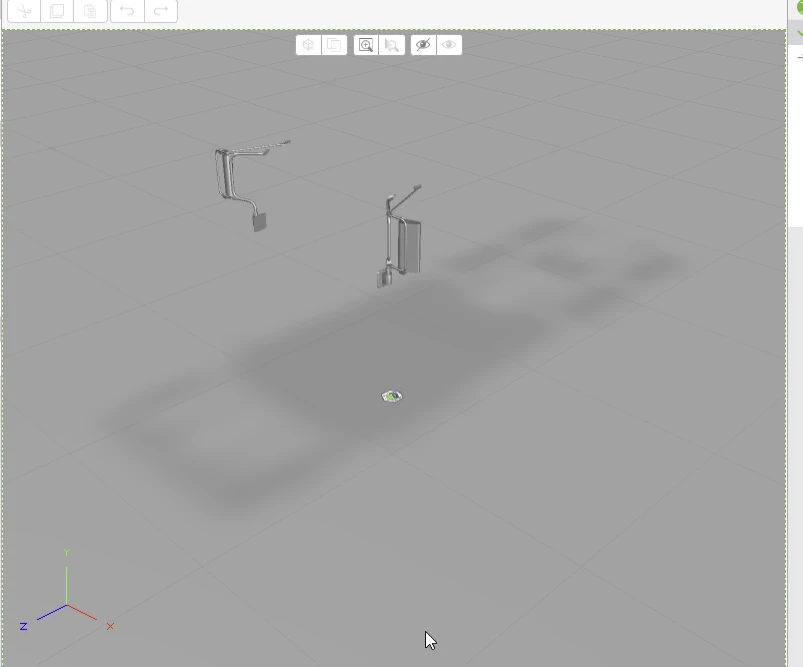
 

2018-10-10 09_22_53-Design - Vuforia Studio.png

1 reply

10-Marble
October 10, 2018

Yes it happened to me yesterday


But I was playing up with some cross section "animation" in the sequence ( which is not supported)


It happened when I select the sequence and also not used CAD Optimzer while importing the PVZ file.

But issue could not reproduce when I use the model from Cad Optimizer


Regards


Taju Joseph


BillRyan16-PearlAuthor
16-Pearl
October 14, 2018

We are using the optimized (High) version of the published file in the experience so our experience is different from yours. 

In the previous version, we had issues getting the mirror's to show up...now they are the item that shows up reliably!  I don't quite understand why PTC wouldn't just use the Creo View/Illustrate graphics engine to display the 3d geometry in the interface.  

1-Visitor
October 15, 2018

So the shadow of the trucks makes me think this is not the case BUT I have had the CAD Optimized remove entire objects during optimization even the High model. Have you opened the High optimized model in Creoview to confirm it displays correctly there? When I have experienced the optimized removing objects they are also gone with viewed in Creo View.


Technically they are not gone but they are often optimized down to a single tiny sphere.


There is a manual method to replace missing models in the pvz, let me know if you need that.