1-Visitor
December 4, 2019
Solved

Layout Problem in 2d View

  • December 4, 2019
  • 1 reply
  • 1373 views

Hi Everyone,


I just created a new empty 2d View in Vuforia Studio.

I added a footer with a grid layout inside but the grid layout does not cover the full width. (see Screenshot)

Now I would like the footer to stretch full width with a 3 Column Layout with elements on the left, right and center of screen.

How can I achieve this?
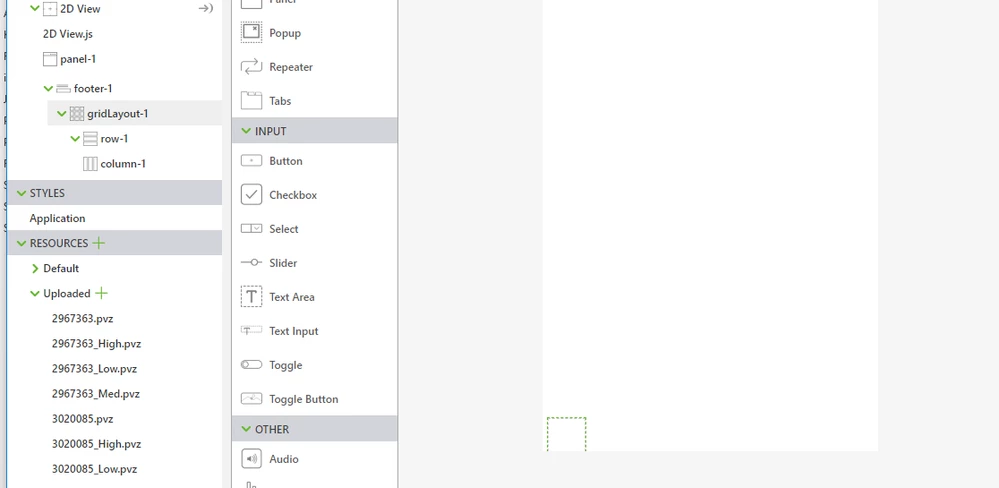


image.png

Best answer by tmccombie

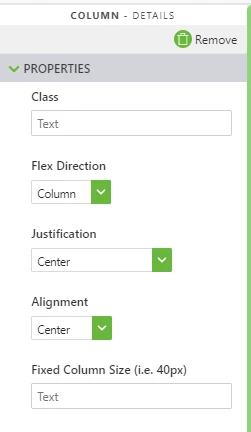
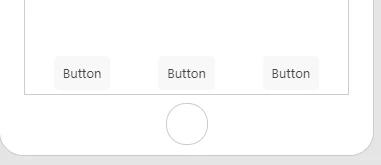
The grid actually does cover the whole width, it just looks a little wonky in the canvas. If you preview or publish and view on a device, you should see that the items are displayed correctly. I created 3 columns with a button in each and set each columns justification & alignment to 'center'.  I confirmed that it displays correctly on an iPhone and iPad. 


image.png

image.png


You can also manually define your column width within the column properties. 

1 reply

tmccombie21-Topaz IAnswer
21-Topaz I
December 4, 2019

The grid actually does cover the whole width, it just looks a little wonky in the canvas. If you preview or publish and view on a device, you should see that the items are displayed correctly. I created 3 columns with a button in each and set each columns justification & alignment to 'center'.  I confirmed that it displays correctly on an iPhone and iPad. 


image.png

image.png


You can also manually define your column width within the column properties. 

SlowJ1-VisitorAuthor
1-Visitor
December 5, 2019

Hi tmccombie,


Thank you for the quick response!

You are right it only looks strange in the canvas.

When I start the Preview everything works like expected.