1-Visitor
August 5, 2020
Solved

layout update based on orientation

  • August 5, 2020
  • 1 reply
  • 2441 views

Hi, 


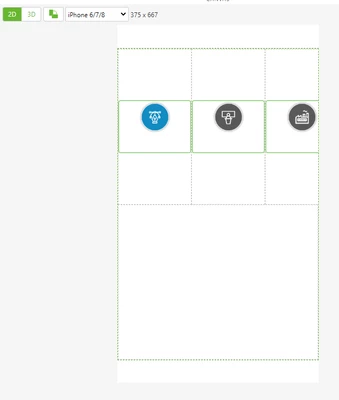
I have created one grid layout and placed 4 icons on it. it is fit perfectly when it is on landscape mode but it doesn't fit in portrait mode. 


can someone tell me how to solve this or any sample solution available to create the grid layout using .js code based on the orientation? 
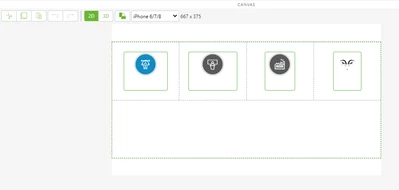
 

landscape.PNGportrait.PNG

Best answer by RolandRaytchev

Hi @krthk86g ,

unfortunately currently is not possible / or difficult to create widget on the fly - at dynamic time.

Mostly you could use to different layout where the one is disabled / invisible and the other one is active depending on the orientation. (this is could be used only for layout where is difficult to manage that it will work for all orientations) because mostly the 2d Widget properties will not update at dynamic time when thy will be change- so far, I remember some tests in the pasts.

So far I remember it is possible to use some style classes which could be set by running time.

1 reply

krthk86g1-VisitorAuthor
1-Visitor
August 5, 2020

solved this.


1. create one grid layout

2. add one column with option fill in a row

3. added all buttons I wanted to fill them in a row so it is adjusted automatically when it was portrait pr landscape. 

5. filled with complete page so added on blank grid layout below this grid layout


placement is perfect now

21-Topaz I
August 6, 2020

Hi @krthk86g ,

is good to see that you found solution in this case.

Additionally I want to point to the following  post: -"Getting Orientation of Mobile Device via Javascript"

Because this will not work in the general case and  in some cases for some more complex layouts it could require to check the current orientation so to optimize  your layout depending on the current device orientation e.g. to have 2 different Gird Layout widgets representing the layout  for each orientation etc

krthk86g1-VisitorAuthor
1-Visitor
August 6, 2020

Hi Ronald,


thank you so much, you mean that I can create entire layout and button functions using js.


where to find the API and object for the window in the guide. do you have a guide, if this is in the developer portal, could you please add one example link so that I can pick up.


Thanks