15-Moonstone
November 23, 2023
Solved

List Uploaded Folder Models

  • November 23, 2023
  • 1 reply
  • 1813 views

Hi community


I have a advanced question. 


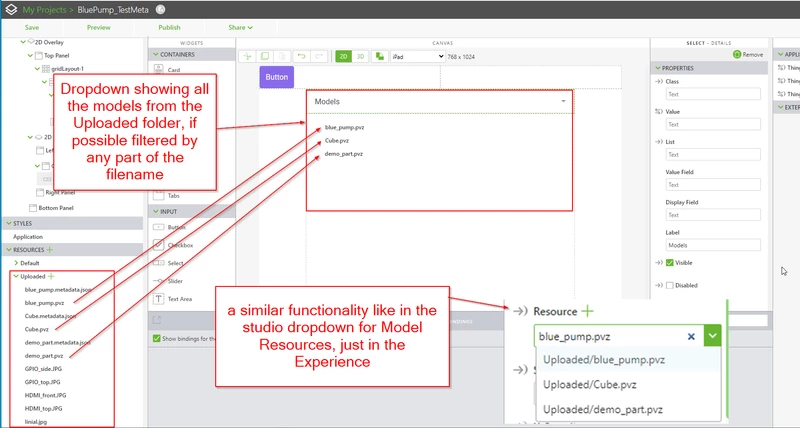
Is it possible to populate a list with parts from the Uploaded folder? The Model Resources selection in Studio does the same thing. But I want the View user to be able to do it, without having to hardcode the model names in JS. If we could filter the models by some part of their name, that would be even better.


AlexK_0-1700728948472.png

Thank you for your help!


Best wishes


Alex


Best answer by RolandRaytchev

Hi @AlexK ,

so far I know this list is  a static list . During the Vuforia View session you can not add any files to the Vuforia Studio Project folder(loaded already in the view app) So that when you have a list in Vuforia Studio it will not change during the view session

I have a similar issue , and solve this issue by creating  a list as text file (I think better will be a json file) and then loading it when  opening the project. something like this:

my list "folderList.txt" in the upload folder

1.6,sonne1.mp4
2.3,ForBiggerJoyrides.mp4
5.6,20201103_173339_HoloLens.mp4

and used then such code like this:

$scope.app.files=[]
 const directory = "app/resources/Uploaded/"
 const file="folderList.txt" 
//=====================================================
 $scope.$on("$ionicView.afterEnter", function (event) {
 $scope.app.getListObj();
})
//=======================================================================

function List_items(display,value,type,size) {
 this.display = display;
 this.value = value;
 this.type=type;
 this.size=size;
 return this;
 
}

//////=========================================================
$scope.app.getListObj=function(){
 var resp = null
 const fullFile=directory+file
 
 function reqListener() {
 // console.log(this.responseText);

 const result = this.responseText.split(/\r?\n/);
 result.forEach(element => { console.log(element ); 
 let size = parseFloat(element.split(",")[0]); 
 let fname =element.split(",")[1]; 
 try{
 $scope.app.files.push(new List_items(fname,directory+fname,fname.split('.').pop(),size)) 
 } catch(e){ console.error(e); console.warn(element)} 
 });//for elem
 $timeout(()=>{
 $scope.setWidgetProp('select-1','list' $scope.app.files )
 $scope.setWidgetProp('select-1','value', $scope.app.files[0].label)
 },250)
}

const req = new XMLHttpRequest();
req.addEventListener("load", reqListener);
req.open("GET", fullFile);
req.send();
 
}//end of getListObje
//=====================================================

 In my case I used this list for some automatic play in the background and not to display it. But I think the same approach could be used also to display the list e.g. in select widget. This was my workflow but possibly there could be a better solution and somebody could share it here. Thanks

1 reply

21-Topaz I
November 23, 2023

Hi @AlexK ,

so far I know this list is  a static list . During the Vuforia View session you can not add any files to the Vuforia Studio Project folder(loaded already in the view app) So that when you have a list in Vuforia Studio it will not change during the view session

I have a similar issue , and solve this issue by creating  a list as text file (I think better will be a json file) and then loading it when  opening the project. something like this:

my list "folderList.txt" in the upload folder

1.6,sonne1.mp4
2.3,ForBiggerJoyrides.mp4
5.6,20201103_173339_HoloLens.mp4

and used then such code like this:

$scope.app.files=[]
 const directory = "app/resources/Uploaded/"
 const file="folderList.txt" 
//=====================================================
 $scope.$on("$ionicView.afterEnter", function (event) {
 $scope.app.getListObj();
})
//=======================================================================

function List_items(display,value,type,size) {
 this.display = display;
 this.value = value;
 this.type=type;
 this.size=size;
 return this;
 
}

//////=========================================================
$scope.app.getListObj=function(){
 var resp = null
 const fullFile=directory+file
 
 function reqListener() {
 // console.log(this.responseText);

 const result = this.responseText.split(/\r?\n/);
 result.forEach(element => { console.log(element ); 
 let size = parseFloat(element.split(",")[0]); 
 let fname =element.split(",")[1]; 
 try{
 $scope.app.files.push(new List_items(fname,directory+fname,fname.split('.').pop(),size)) 
 } catch(e){ console.error(e); console.warn(element)} 
 });//for elem
 $timeout(()=>{
 $scope.setWidgetProp('select-1','list' $scope.app.files )
 $scope.setWidgetProp('select-1','value', $scope.app.files[0].label)
 },250)
}

const req = new XMLHttpRequest();
req.addEventListener("load", reqListener);
req.open("GET", fullFile);
req.send();
 
}//end of getListObje
//=====================================================

 In my case I used this list for some automatic play in the background and not to display it. But I think the same approach could be used also to display the list e.g. in select widget. This was my workflow but possibly there could be a better solution and somebody could share it here. Thanks
21-Topaz I
November 23, 2023

I think, when you have often such tasks (where you need a list of files)  - you could use some tools to create  the list of the files in the directory /or list of  directories. e.g. node.js ( e.g. referring to link)


let ProjectPathsrc='C:/Users/rraytchev/Documents/VuforiaStudio/Projects/Test_Eyewear'
let folder='/src/phone/resources/Uploaded'
//--------
var fs = require('fs');
var files = fs.readdirSync(ProjectPathSrc+folder);
 files.forEach(function (fname) {
 try{
 $scope.app.files.push(new List_items(fname,directory+fname)) 
// not sure if the fname is with path or only the name 
// if path then use this below instead
// $scope.app.files.push(new List_items(fname,directory+fname)) 
//var path = require('path');
//var file_name = path.basename(fname);
//$scope.app.files.push(new List_items(file_name,fname)) 
 } catch(e){ console.error(e); console.warn(element)} 
}


so later the json object containing the list  (here in the variable $scope.app.files  could be saved to file (referring to the link)


13-Aquamarine
January 17, 2024

Hello @RolandRaytchev , I tried to use this code of yours in my experience but what I get is "ReferenceError: require is not defined"