1-Visitor
May 15, 2019
Solved

Modify thingworx data from vuforia studio

Hi,


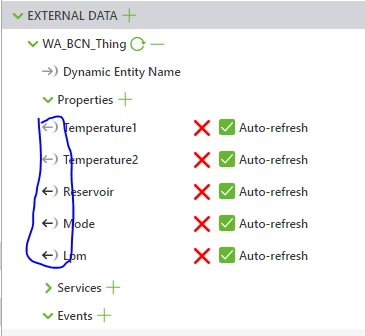
Can anyone help me how I am able to modify values in thingworks with vuforia studio? Is it possible? As you see in attached picture only one direction is available.

 vuf.PNG


Thanks in advance

Janos

21-Topaz I
May 15, 2019

Hi @Janos1987 ,


yes is possible.  So far I remember two methods to set data in thingworx

1.) using a thingworx service with argument which will set the data to thingworx thing .

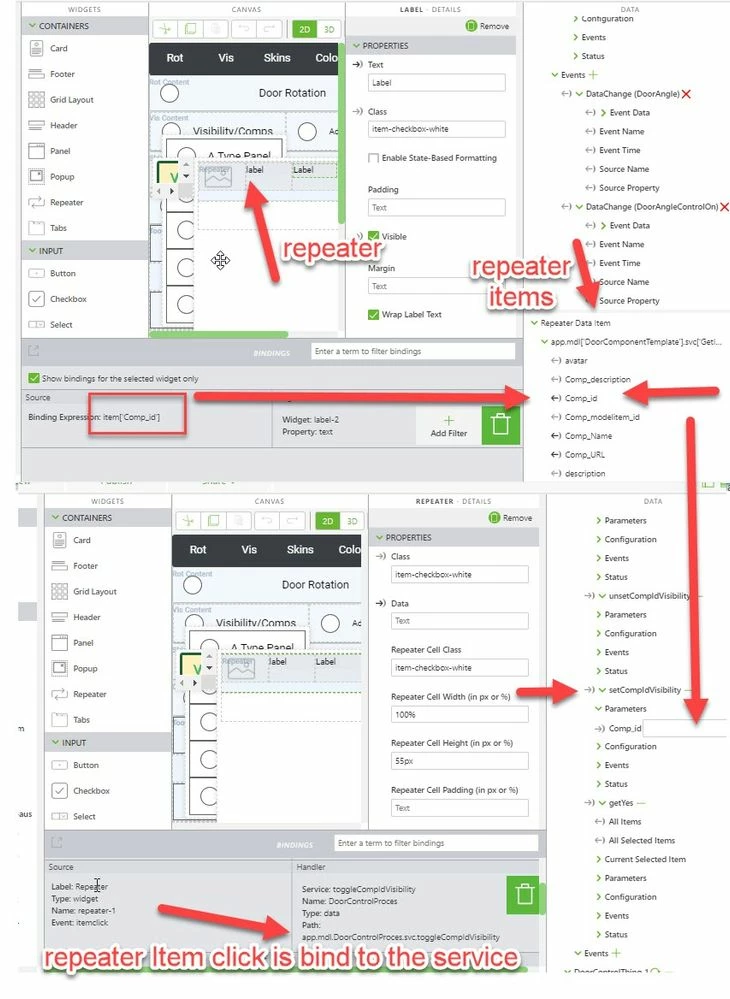
Here is an example with a repeat widget which togle the visibility of component
2019-05-15_15-42-21.jpg

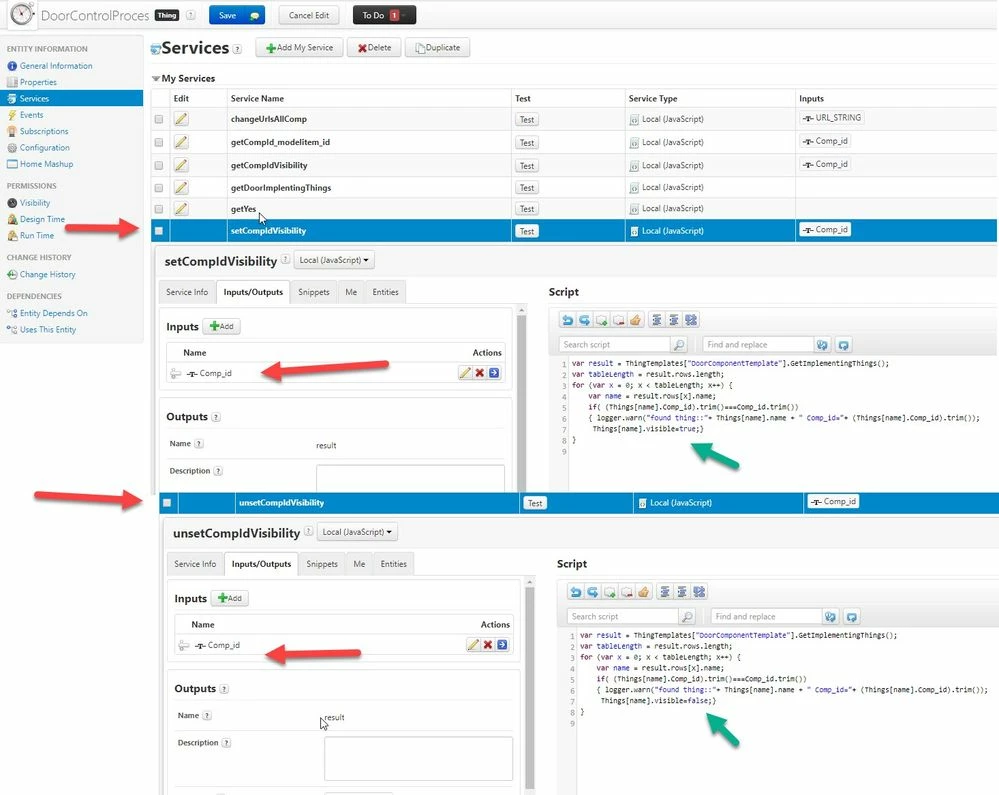
The repeater click event will call the service setCompIdVisibility. The repeater item Comp_id is bind to the method paramater. So when we click the repeater for a selected item it will call the service setCompIdVisibilitysetCompIdVisibility with Comp_id as argument and will change the visibility status in the Thingworx  this is a thing property
2019-05-15_15-53-56.jpg


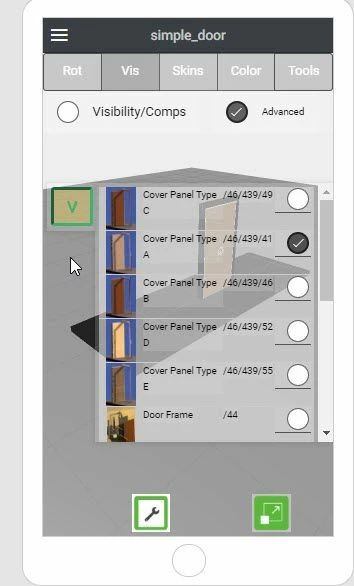
And in preview mode it looks like:


2019-05-15_15-55-45.jpg


2.) using some Rest API which will set the data.

Here is an example of  similar service but using a REST API call


//////////////////////////////////////////////////////////////////////////////////////
$scope.setCompVis = function(Comp_id,val) {

 if(val==true)
 var serviceStr='setCompIdVisibility';
 else
 var serviceStr='unsetCompIdVisibility';

var req = {
"method":'POST',
"url":'/Thingworx/Things/DoorControlProces/Services/'+serviceStr+'?Appkey="bfXX15Xf-cfnd-5538-98ft-7201d728457" HTTP/1.1',
"Host": 'XXXXXXXXX.studio-trial.thingworx.io:8443',
"Content-Type": 'application/json',
 "AppKey": "bfXX15Xf-cfnd-5538-98ft-7201d728457",
"Cache-Control": 'no-cache',
"Postman-Token": '99e788f6-XXXX-XXXX-555c-b87f451dc144',
 "headers": {
 "authorization": "Basic Og==",
 "content-type": "application/json",
 "AppKey": "bfXX15Xf-cfnd-5538-98ft-7201d728457",
 "cache-control": "no-cache",
 "postman-token": "c1871006-XXXX-0ae1-1002-092221d9dtnf"
 },
 "processData": false,
 "data": "{\n\t\"Comp_id\":\""+Comp_id+"\"\n\t\n}"
};

console.log("$scope.setCompVis");
console.warn(req);

$http(req).then(
function(response) {;}, 
function(response){;}
 );

};//finished $scope.setCompVis
//////////////////////////////////////////////////////////////////////////


OK , it looks a little complicated but it is easy to generate this code if you use a tool like the Google POSTMAN where first you can test the Rest API request with the user Interface 
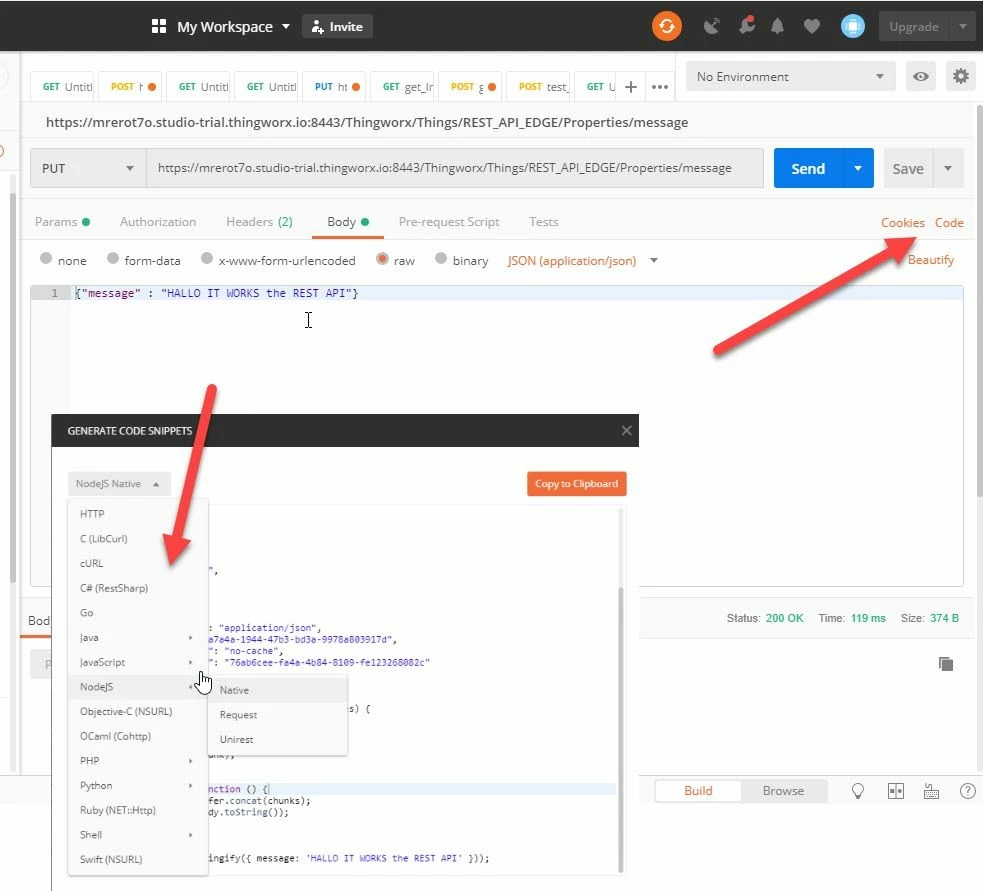
 

2019-05-15_16-39-35.jpg

And later you can generate JavaScript or node.Js programming code . The mention sample funciton above  was created using this tool.  Here the JS function setCompVis() has 2 arguments 

val - /true/ false  -> depending on this value it  will call   different services to set  (true to visible -> serviceStr='setCompIdVisibility' )  unset (false to invisible - will call serviceStr='unsetCompIdVisibility')  the visiblity property of component

cmp_id -> this is the component id (syntax what is used for the modelitem widget  property->  Component Occurrence 

So that the simple call of the function:

$scope.test_fnct = function(){
 $scope.setCompVis("/46/390",true);
};


it will call the service  setCompIdVisibility  of  the thing which have property Comp_id ="/46/390" and set the property visible to true. In this case this is  the component "vertical_beam1"
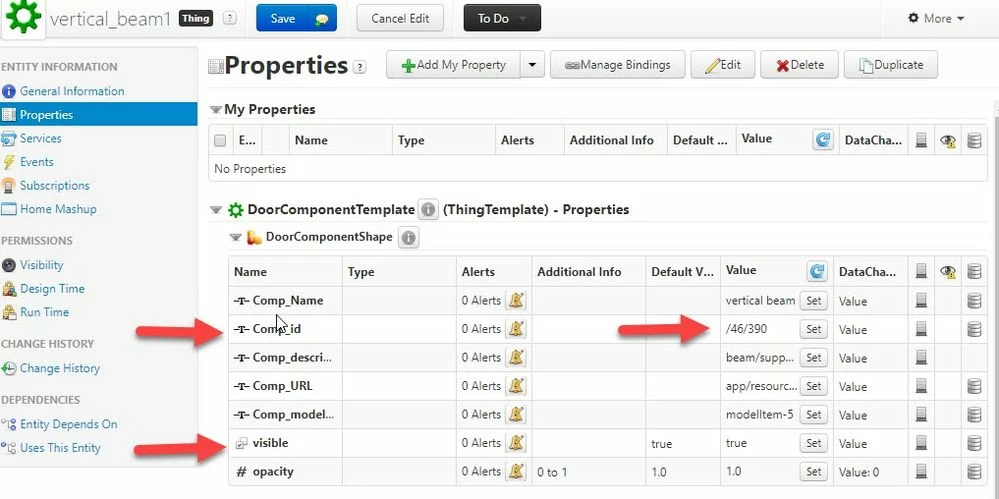
 

2019-05-15_16-51-48.jpg


2 replies

21-Topaz I
May 15, 2019

Hi @Janos1987 ,


yes is possible.  So far I remember two methods to set data in thingworx

1.) using a thingworx service with argument which will set the data to thingworx thing .

Here is an example with a repeat widget which togle the visibility of component

2019-05-15_15-42-21.jpg

The repeater click event will call the service setCompIdVisibility. The repeater item Comp_id is bind to the method paramater. So when we click the repeater for a selected item it will call the service setCompIdVisibilitysetCompIdVisibility with Comp_id as argument and will change the visibility status in the Thingworx  this is a thing property

2019-05-15_15-53-56.jpg


And in preview mode it looks like:


2019-05-15_15-55-45.jpg


2.) using some Rest API which will set the data.

Here is an example of  similar service but using a REST API call


//////////////////////////////////////////////////////////////////////////////////////
$scope.setCompVis = function(Comp_id,val) {

 if(val==true)
 var serviceStr='setCompIdVisibility';
 else
 var serviceStr='unsetCompIdVisibility';

var req = {
"method":'POST',
"url":'/Thingworx/Things/DoorControlProces/Services/'+serviceStr+'?Appkey="bfXX15Xf-cfnd-5538-98ft-7201d728457" HTTP/1.1',
"Host": 'XXXXXXXXX.studio-trial.thingworx.io:8443',
"Content-Type": 'application/json',
 "AppKey": "bfXX15Xf-cfnd-5538-98ft-7201d728457",
"Cache-Control": 'no-cache',
"Postman-Token": '99e788f6-XXXX-XXXX-555c-b87f451dc144',
 "headers": {
 "authorization": "Basic Og==",
 "content-type": "application/json",
 "AppKey": "bfXX15Xf-cfnd-5538-98ft-7201d728457",
 "cache-control": "no-cache",
 "postman-token": "c1871006-XXXX-0ae1-1002-092221d9dtnf"
 },
 "processData": false,
 "data": "{\n\t\"Comp_id\":\""+Comp_id+"\"\n\t\n}"
};

console.log("$scope.setCompVis");
console.warn(req);

$http(req).then(
function(response) {;}, 
function(response){;}
 );

};//finished $scope.setCompVis
//////////////////////////////////////////////////////////////////////////


OK , it looks a little complicated but it is easy to generate this code if you use a tool like the Google POSTMAN where first you can test the Rest API request with the user Interface 


2019-05-15_16-39-35.jpg

And later you can generate JavaScript or node.Js programming code . The mention sample funciton above  was created using this tool.  Here the JS function setCompVis() has 2 arguments 

val - /true/ false  -> depending on this value it  will call   different services to set  (true to visible -> serviceStr='setCompIdVisibility' )  unset (false to invisible - will call serviceStr='unsetCompIdVisibility')  the visiblity property of component

cmp_id -> this is the component id (syntax what is used for the modelitem widget  property->  Component Occurrence 

So that the simple call of the function:

$scope.test_fnct = function(){
 $scope.setCompVis("/46/390",true);
};


it will call the service  setCompIdVisibility  of  the thing which have property Comp_id ="/46/390" and set the property visible to true. In this case this is  the component "vertical_beam1"

 

2019-05-15_16-51-48.jpg


Translate
Janos19871-VisitorAuthor
1-Visitor
May 16, 2019

Hi @RolandRaytchev ,


many thanks it helped me a lot. I used the first instruction of yours. I run a service with Vuforia studio and it overwrites the value on the thingworx. It is so easy but i am a beginner :). Thanks a lot again.


Janos

Translate