

1-Visitor
May 25, 2022
Solved

Multi object detection and tracking in model target

  • May 25, 2022
  • 1 reply
  • 2429 views


I have created model target for two object and created a database of the two object (Trained) and export the file.
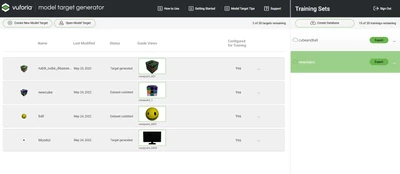
VC_10321466_0-1653452999479.png


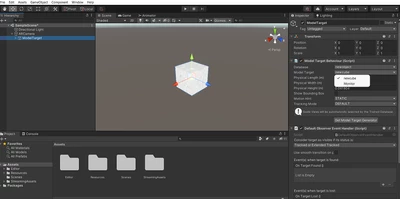
I have imported the database to Unity 
 

VC_10321466_1-1653453080406.png

1) I have selected the imported database - here new object
2) In model target showing the two object that I have trained - here "newcube" and "monitor"

3) I have selected the new cube and added a 3d object for detection on cube - place a 3d model of rubix cube - child of model target


4) Then selected the "Monitor" and placed a 3d model of monitor - child of model target
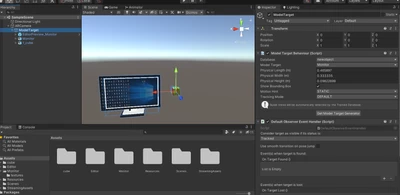
 

VC_10321466_2-1653454885817.png


But my Objects are not tracking when adding two or more objects - when adding single objects its tracking 


The way I have done is correct or not for multi target object detection please help @tmccombie @Suraj_Patil 

Best answer by RolandRaytchev

Hi @vipinchandran ,

your question acctually  is not related to Vuforia Studio but more then to Vuforia Engine  functionality. So it should be addressed to the Vuforia Engine Forum https://developer.vuforia.com/forum 

Additionally I could refer to the Engine Example  in the Unity Assets store https://assetstore.unity.com/?q=vuforia&orderBy=1 . I believe there is an example demonstrating how to use Model Target -> one of the scene with the name MultiTarget in the asset https://assetstore.unity.com/packages/templates/packs/vuforia-core-samples-99026


1 reply

21-Topaz I
May 25, 2022

Hi @vipinchandran ,

your question acctually  is not related to Vuforia Studio but more then to Vuforia Engine  functionality. So it should be addressed to the Vuforia Engine Forum https://developer.vuforia.com/forum 

Additionally I could refer to the Engine Example  in the Unity Assets store https://assetstore.unity.com/?q=vuforia&orderBy=1 . I believe there is an example demonstrating how to use Model Target -> one of the scene with the name MultiTarget in the asset https://assetstore.unity.com/packages/templates/packs/vuforia-core-samples-99026