11-Garnet
July 6, 2022
Solved

Navigator / zones of interest extension

  • July 6, 2022
  • 1 reply
  • 2218 views

Hi,


I found https://github.com/steveghee/OCTO_Studio_extensions and successfully added it to studio.


I'm really interested in navigator or zones of interest but I can't figure out how they work. I try to set the value from javascript but the screen in preview is blank. 


I would like to ask if someone can provide me working example/project of this extensions.

Best answer by RolandRaytchev

Because I did not use this OCTO widget in the past - wanted to test. - OCTO navigator  and tested on IOS - added in the Home.js:

$scope.$on('$ionicView.afterEnter',()=> {
$scope.view.wdg['navigator-1'].poidata = [ 
 { position: "0,0,0", // defined as a string of xyz coordinates 
 gaze: "0,0,1", // defined as a string, this is a unit vector pointing away from the view
 up: "0, 1, 0", // defined as a string, this is a unit vector pointing up through the device
 cutoff: 1.2, // optional, if provided this will override the widget-level cutoff setting FOR THIS poi
 metadata: "optional" // optional data that can be used to describe what this row indicates. can be string or {} object
 }
 ];
})

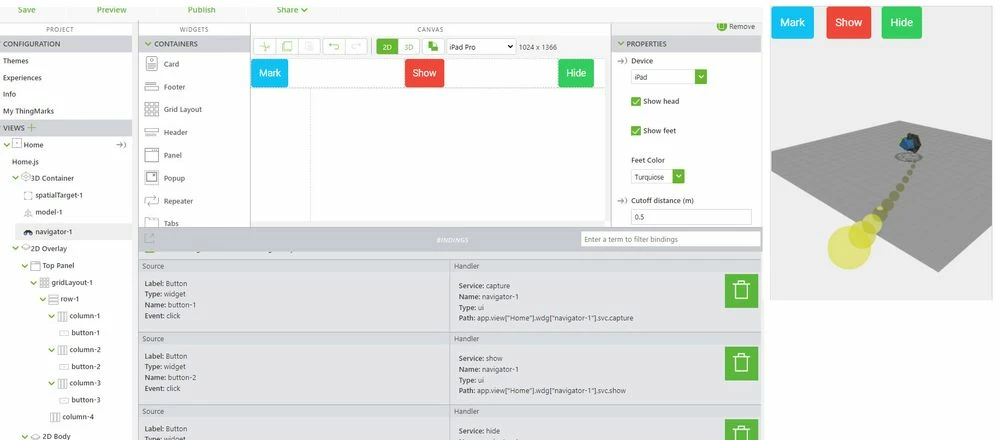
specified the IPad in the device property of the navigator-1 
2022-07-08_15-42-55.jpg

linked 3 buttons to the available service and tested.

The first impression is that it seems to work in the current studio version - so tested it in chrome preview and then on IOS IPad pro device - this worked -> means it could show  the colored points to the specified space point/coord. The navigation was working in generally  but  of course need to verify further  if the behavior is as indented and also what the other settings will do but seems that in generally it should work




1 reply

21-Topaz I
July 8, 2022

Hi @KlemenM ,

do you mean in your question a specific extension from the OCTO github?

In the readme.md there is mentioned in the section navigation 2 widgets navigator and zones - is that what you want to use?

Which one or both? And what is the result of testing on mobile or HL?

KlemenM11-GarnetAuthor
11-Garnet
July 8, 2022

Yes my question is about OCTO extensions. I want to test how both of extensions work in action but I'm unable to do so. I used the code from readme.md but the screen in preview of the mobile project is blank, I probably wrote the code wrong. I want to point user to specific location for which I currently use "pinger". 


21-Topaz I
July 8, 2022

Because I did not use this OCTO widget in the past - wanted to test. - OCTO navigator  and tested on IOS - added in the Home.js:

$scope.$on('$ionicView.afterEnter',()=> {
$scope.view.wdg['navigator-1'].poidata = [ 
 { position: "0,0,0", // defined as a string of xyz coordinates 
 gaze: "0,0,1", // defined as a string, this is a unit vector pointing away from the view
 up: "0, 1, 0", // defined as a string, this is a unit vector pointing up through the device
 cutoff: 1.2, // optional, if provided this will override the widget-level cutoff setting FOR THIS poi
 metadata: "optional" // optional data that can be used to describe what this row indicates. can be string or {} object
 }
 ];
})

specified the IPad in the device property of the navigator-1 

2022-07-08_15-42-55.jpg

linked 3 buttons to the available service and tested.

The first impression is that it seems to work in the current studio version - so tested it in chrome preview and then on IOS IPad pro device - this worked -> means it could show  the colored points to the specified space point/coord. The navigation was working in generally  but  of course need to verify further  if the behavior is as indented and also what the other settings will do but seems that in generally it should work