Occlusion Illusion - DepthMask
Dear PTC and Vuforia users,
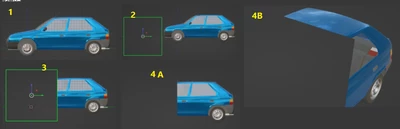
I would like to use Vuforia Studio in conjuction with Model Targets, however the results we get this way are funky, that is Vuforia does not occlude the objects behind the real world like I've seen on some ARcore video. In Vuforia Engine for Unity Engine there is a material called "DepthMask", the same thing is called HoldOut shader in Blender. What it does is it hides an object behind an invisible object. What is in front of the object remains shown, what is behind is hidden with the masking object being invisible.
This way I could target e.g. a toy car, target it as a model target, display air flow streamlines around the car while hiding those, who are behind the car.
I've seen a topic about TML shaders in for Vuforia Studio (Xray, dots...), but I do not know how to create my own. It would be nice, if there was a topic or a tool to convert Unity Material/Shader into a TML/GLSL text compatible with Vuforia Studio.
Anyways - would anyone be so kind and create such a shader? I would be most grateful.
Thank You in advance,
With kind regards,
Tomáš