

1-Visitor
August 21, 2019
Solved

On-Premise Experience Server - Deleting Published AR Products(?)

  • August 21, 2019
  • 1 reply
  • 3783 views

Hello,


We have an on-premise experience server to store AR Projects published from Vuforia Studio. Through this community I learned that projects can be accessed via the file explorer as a sort of "back-door" method. This is helpful for a number of reasons. I ended up with a lot of projects, and in order to clean things up I transferred most of them to another folder to access later. I changed the folder names of some of them.


This is the problem --

I cannot delete them from the ES (experience server) anymore. Even when I remote-access the ES, find the project files, and delete them, they still show up in the library's list of options on the iPhone and HoloLens. There must be some hidden .json file on the ES that keeps a list of published AR projects. I need to access this and manually remove some entries. Has anyone tried this?

Any ideas? Thanks.
Best answer by sdidier

Hello Wes,


Curl command is available in Linux and in MacOs or in Windows 10 since version 1804.

https://ec.haxx.se/get-curl-windows.html


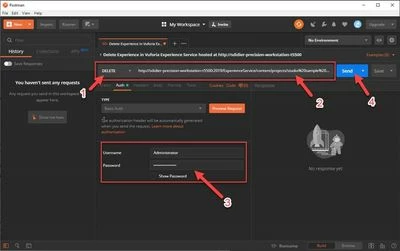
An alternative in Windows or in Macos, is to use postman.

https://www.getpostman.com/downloads/


I have tried the command in cURL as described in documentation and also Postman.postman_delete_experience.jpg


I have an error reported in both cases.

{
 "message": "Header x-requested-with is missing or invalid",
 "errorCode": "",
 "error": {}
}


I am investigating that to update the documentation if needed.


Best regards,

Samuel

1 reply

15-Moonstone
August 22, 2019

I am facing same issue

17-Peridot
August 22, 2019

Hello Wes and Swapnil,


In Vuforia Experience Service, the Experience files are loaded in the folder defined in configuration.json file, in "projects" : in "storePath": setting.

But data is created also in database (sqlite or postgresql) of Vuforia Experience Service in appstore table.

So, delete the files directly in the server is not enough.


The right ways to delete an Experience hosted in a Vuforia Experience Service are :

      1. In Vuforia Studio, in Home page, in Project thumbnail, click Trash button

      Or

      2. Run HTTP request to delete it as described in help center :

http://support.ptc.com/help/vuforia/studio/en/#page/Studio_Help_Center%2FDeleteProjectsFromCmdLine.html%23

     Or

      3. It might be a problem in cache of Vuforia View.

          Did you have try to clean it ?


Best regards,

Samuel

15-Moonstone
August 22, 2019

Yes, I tried this by clearing caches.